Swingbench
Changes...
21/08/20 11:41
Some of you may have heard that I recently changed roles and now work for Google. That means a lot of the content I produce will be more generic in nature working against multiple databases rather than just Oracle. Swingbench will stay Oracle focused since the work to convert it to another database would likely be too complicated to merit the migration. However I do plan to develop more generic tools that will provide a balanced comparison of databases. I will still maintain swingbench and fix and improve functionality to keep it compatible with newer versions of Oracle. Clearly there will be a little delay in version compatible releases since I no longer have access to the newer versions of the JDBC drivers.
To make it easier to maintain the code I'm moving the download of code and issue creation to GitHub. I'm hoping this will make it easier to track problems as they arise and quicker to fix.
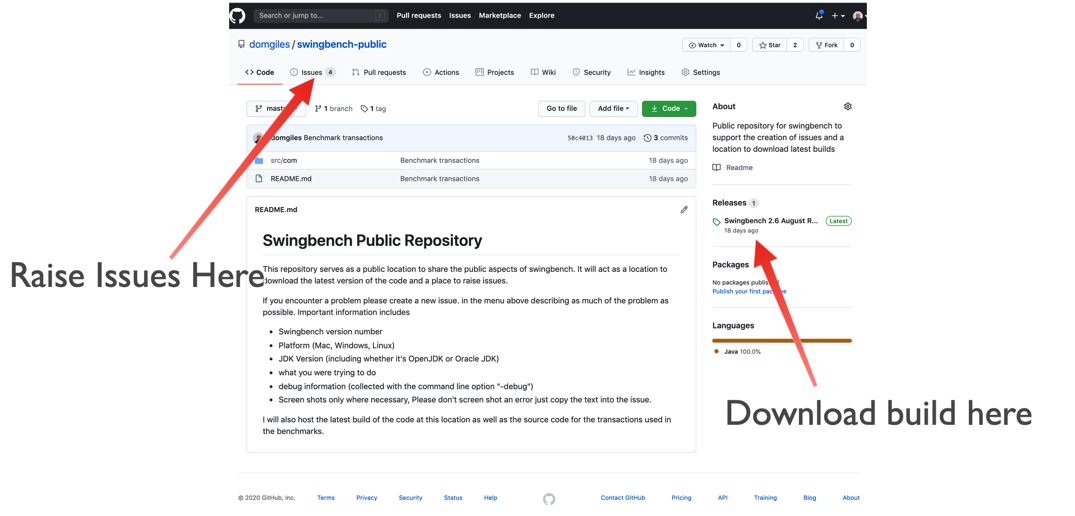
So from now on can you please head over to the public swingbench Github repository (https://github.com/domgiles/swingbench-public). You'll be able to download the newest version of the code from there (https://github.com/domgiles/swingbench-public/releases/download/production/swingbenchlatest.zip) and raise new issues as shown in the picture below.
So everything changes and everything stays the same…
To make it easier to maintain the code I'm moving the download of code and issue creation to GitHub. I'm hoping this will make it easier to track problems as they arise and quicker to fix.
So from now on can you please head over to the public swingbench Github repository (https://github.com/domgiles/swingbench-public). You'll be able to download the newest version of the code from there (https://github.com/domgiles/swingbench-public/releases/download/production/swingbenchlatest.zip) and raise new issues as shown in the picture below.
So everything changes and everything stays the same…
Comments
Updates to Swingbench and Datagenerator
18/11/19 21:33
I've added a few tweaks to Swingbench and Datagenerator to improve functionality and stability. I also took the opportunity to update the database drivers to 19c.
New build of swingbench... Testers needed!!
14/01/18 19:04
I've just finished a new build of swingbench 2.6 and it has a lot (and I mean a lot) of under the cover changes to try and take advantage of some Java8 features. Most of the changes are to simplify the code and make sure that some of the more complicated concurrent code works as expected. I'd really appreciate it if you get a chance to try this version out and provide me with some feedback.
Change log
As always you can download it from here
Change log
- Reverted back to the old chart engine rather than JavaFX to ensure charts now render on Linux as well as Mac and Windows
- Improvements in code to ensure that results are always written to a results file or the screen
- Charbench now has the option of producing a simple human readable report at the end of the run via the "-mr" command line option
- Users can now update the meta data at the end of a run with the sbutil utility to ensure it reflects the changes that have taken place
- Better handling of errors when attempting to start graphical utils on server without an output device to render to (headless)
As always you can download it from here
Sharding videos on Youtube
27/06/17 11:54
I've uploaded 3 videos on installing and configuring sharding in Oracle Database 12c Release 2. I use Virtual Box running Oracle Linux to create a sharded database and run a swingbench workload against it. In part 3 I then add a new shard online and monitor the database as the data is rebalanced across the cluster. You can see them below but I reccomend running them full screen because there's quite a lot going on.
Part 1
Part 2
Part 3
Swingbench 2.6 Beta is now available
02/03/17 11:54
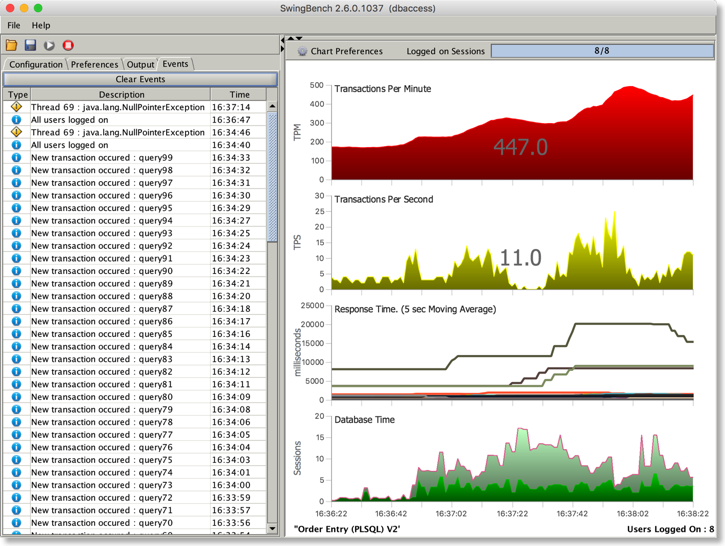
To celebrate the release of Oracle Database 12c Release 2, I'm releasing swingbench 2.6 into the wild. New features include
- New JSON benchmark
- New TPC-DS Like benchmark
- New Declarative approach to creating a user defined benchmark
- New SQL Query Editor to create queriers for the user defined benchmark
- New chart rendering engine
- Starting swingbench without a named config file now shows a "Select Benchmark" dialogue
- Many internal fixes
- Normal stats collection estimates percentiles
- The stats files also contain tps,cpu and io readings where available.
- Support for remote connectivity to Oracle Cloud in connection dialogues
- New "SBUtil" (Swingbench Utility) to validate benchmarks and scale them up (SH and OE Only at present)
- New "results2pdf" utility to convert results files into pdfs
Video on SQLBuilder for swingbench 2.6
02/03/17 10:58
I've posted a video showing the new SQLBuilder functionality of swingbench 2.6 to YouTube. You can check it out here
I'll be uploading the code shortly to the usual place.
I'll be uploading the code shortly to the usual place.
Video on the new features of swingbench 2.6
10/02/17 19:10
I've posted a video showing some of the new features of swingbench 2.6 to YouTube. You can check it out here
I'll be uploading the code shortly to the usual place.
I'll be uploading the code shortly to the usual place.
SBUtil in Action (And Some Fixes)
12/03/15 18:44
As a means of demonstrating what you can achieve with SBUtil I’ve created a little test to show it’s possible to trivially change the size of the data set and rerun the same workload to show how TPS can vary if the SGA/Buffer Cache is kept consistent.
First the script
I’m hoping it should be fairly obvious what the script does. I create a tablespace big enough to accommodate the final data set (In this instance 1TB). This way I’m not constantly auto extending the tablespace. Then I create a seed schema at 1GB in size. Then I run a workload against the schema, this will remain constant through all of the tests. Each of the load tests runs for 10min and collects full stats. After the test has completed I use “sbutil” to replicate the schema and simply rerun the workload writing the results to a new file. By the end of the tests and duplication the end schema has roughly ½ a Terabytes worth of data and about the same in indexes. The benefit of this approach is that it’s much quicker to expand the data than using the wizard to do it.
The directory will now contain all of the results files which can be processed trivially using the the “parse_results.py” script in utils directory. In the example below I simply parse all of the files and write the result to a file called res1.csv. Because the python script is so easy to modify you could pull out any of the stats from the file. I’m just using the ones that it collects by default
On completing this step I can use my favourite spread sheet tool to load res1.csv and take a look at the data. In this instance I’m using “Numbers” on OS X but Excel would work equally as well.
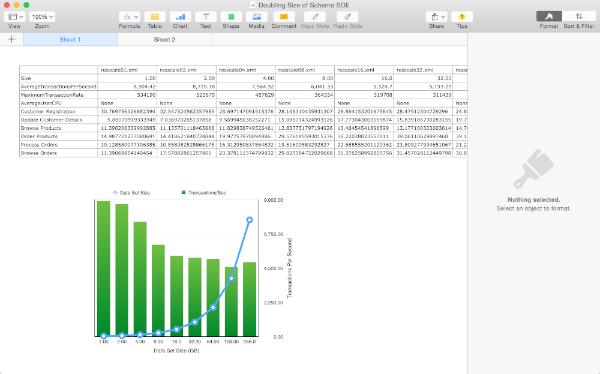
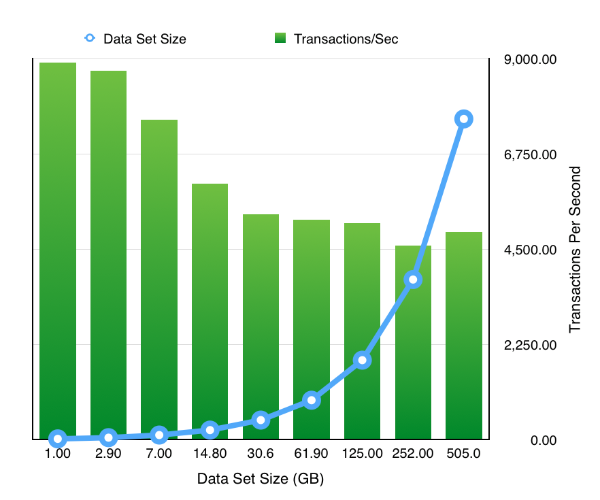
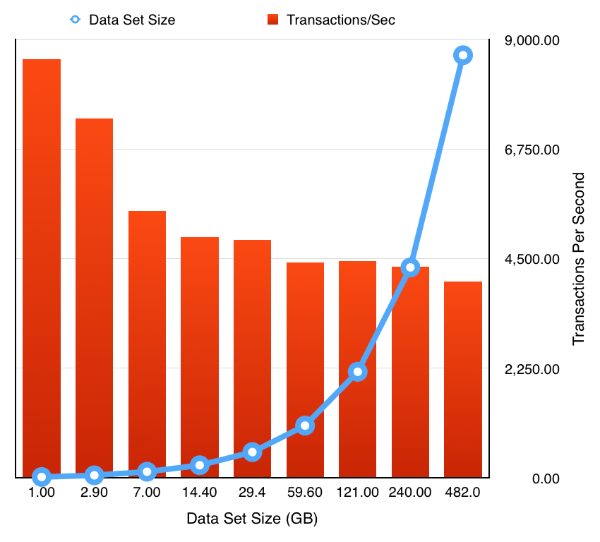
The resulting chart shows pretty much what we’d expect .That doubling the size of the datasets but keeping the workload and SGA constant results in a reduction of the TPS. Which tails off quickly as the data set quickly outgrows the buffer cache and we are forced to perform physical IOs, but declines less slowly after this impact is felt. It’s something we would expect but it’s nice to able to demonstrate it.
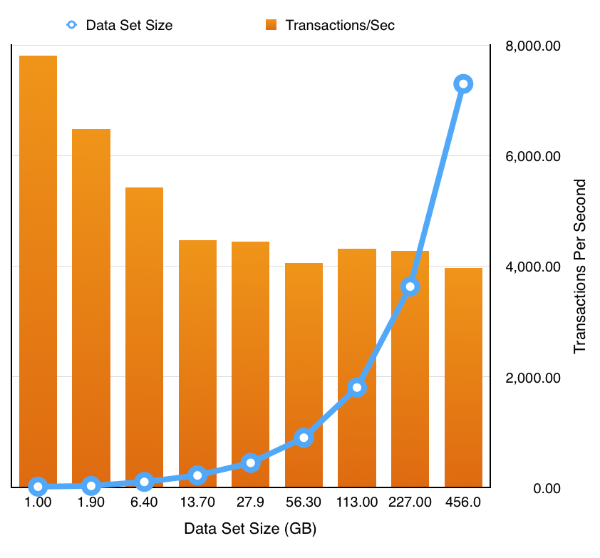
So the next obvious question is how easy is it to rerun the test but to enable a feature like partitioning. Really easy. Simply ask oewizard to create the schema using hash partitioning i.e. change
to
and rerun the tests to produce the following results
Or even enabling compression and partitioning by simply replacing the first sbutil operation with
During the testing of this I fixed up a few bugs which I wasn’t aware of so it’s worth downloading a new build which you can find here. I also released I needed a few more options on the utility to round it out. These were
I’ll most likely add a few more over the coming weeks.
Just a word of caution… I’ve noticed that my stats collection is broken. I don’t cater for all of the possible version/configurations in my script and so it can break on large stats collections and go serial. I’ll try and fix this next week.
First the script
#!/bin/bash

sqlplus sys/welcome1@//ed2xcomp01/DOMS as sysdba << EOF
create bigfile tablespace SOE datafile size 1000G;
exit;
EOF

time ./oewizard -scale 1 -dbap welcome1 -u soe -p soe -cl -cs //ed2xcomp01/DOMS -ts SOE -create

time ./charbench -u soe -p soe -cs //ed2xcomp01/DOMS -uc 128 -min -0 -max 0 -stats full -rt 0:10 -bs 0:01 -a -r resscale01.xml

time ./sbutil -u soe -p soe -cs //ed2xcomp01/DOMS -soe -parallel 64 -dup 2

time ./charbench -u soe -p soe -cs //ed2xcomp01/DOMS -uc 128 -min -0 -max 0 -stats full -rt 0:10 -bs 0:01 -a -r resscale02.xml

time ./sbutil -u soe -p soe -cs //ed2xcomp01/DOMS -soe -parallel 64 -dup 2

time ./charbench -u soe -p soe -cs //ed2xcomp01/DOMS -uc 128 -min -0 -max 0 -stats full -rt 0:10 -bs 0:01 -a -r resscale04.xml

time ./sbutil -u soe -p soe -cs //ed2xcomp01/DOMS -soe -parallel 64 -dup 2

time ./charbench -u soe -p soe -cs //ed2xcomp01/DOMS -uc 128 -min -0 -max 0 -stats full -rt 0:10 -bs 0:01 -a -r resscale08.xml

time ./sbutil -u soe -p soe -cs //ed2xcomp01/DOMS -soe -parallel 64 -dup 2

time ./charbench -u soe -p soe -cs //ed2xcomp01/DOMS -uc 128 -min -0 -max 0 -stats full -rt 0:10 -bs 0:01 -a -r resscale16.xml

time ./sbutil -u soe -p soe -cs //ed2xcomp01/DOMS -soe -parallel 64 -dup 2

time ./charbench -u soe -p soe -cs //ed2xcomp01/DOMS -uc 128 -min -0 -max 0 -stats full -rt 0:10 -bs 0:01 -a -r resscale32.xml

time ./sbutil -u soe -p soe -cs //ed2xcomp01/DOMS -soe -parallel 64 -dup 2

time ./charbench -u soe -p soe -cs //ed2xcomp01/DOMS -uc 128 -min -0 -max 0 -stats full -rt 0:10 -bs 0:01 -a -r resscale64.xml

time ./sbutil -u soe -p soe -cs //ed2xcomp01/DOMS -soe -parallel 64 -dup 2

time ./charbench -u soe -p soe -cs //ed2xcomp01/DOMS -uc 128 -min -0 -max 0 -stats full -rt 0:10 -bs 0:01 -a -r resscale128.xml

time ./sbutil -u soe -p soe -cs //ed2xcomp01/DOMS -soe -parallel 64 -dup 2

time ./charbench -u soe -p soe -cs //ed2xcomp01/DOMS -uc 128 -min -0 -max 0 -stats full -rt 0:10 -bs 0:01 -a -r resscale256.xml
I’m hoping it should be fairly obvious what the script does. I create a tablespace big enough to accommodate the final data set (In this instance 1TB). This way I’m not constantly auto extending the tablespace. Then I create a seed schema at 1GB in size. Then I run a workload against the schema, this will remain constant through all of the tests. Each of the load tests runs for 10min and collects full stats. After the test has completed I use “sbutil” to replicate the schema and simply rerun the workload writing the results to a new file. By the end of the tests and duplication the end schema has roughly ½ a Terabytes worth of data and about the same in indexes. The benefit of this approach is that it’s much quicker to expand the data than using the wizard to do it.
The directory will now contain all of the results files which can be processed trivially using the the “parse_results.py” script in utils directory. In the example below I simply parse all of the files and write the result to a file called res1.csv. Because the python script is so easy to modify you could pull out any of the stats from the file. I’m just using the ones that it collects by default
$ python ../utils/parse_results.py -r resscale01.xml resscale02.xml resscale04.xml resscale08.xml resscale16.xml resscale32.xml resscale64.xml resscale9128.xml resscale9256.xml -o res1.csv
On completing this step I can use my favourite spread sheet tool to load res1.csv and take a look at the data. In this instance I’m using “Numbers” on OS X but Excel would work equally as well.
The resulting chart shows pretty much what we’d expect .That doubling the size of the datasets but keeping the workload and SGA constant results in a reduction of the TPS. Which tails off quickly as the data set quickly outgrows the buffer cache and we are forced to perform physical IOs, but declines less slowly after this impact is felt. It’s something we would expect but it’s nice to able to demonstrate it.
So the next obvious question is how easy is it to rerun the test but to enable a feature like partitioning. Really easy. Simply ask oewizard to create the schema using hash partitioning i.e. change
time ./oewizard -scale 1 -dbap welcome1 -u soe -p soe -cl -cs //ed2xcomp01/DOMS -ts SOE -create
to
time ./oewizard -scale 1 -hashpart -dbap welcome1 -u soe -p soe -cl -cs //ed2xcomp01/DOMS -ts SOE -create
and rerun the tests to produce the following results
Or even enabling compression and partitioning by simply replacing the first sbutil operation with
time ./sbutil -u soe -p soe -cs //ed2xcomp01/DOMS -soe -parallel 64 -dup 2 -ac
During the testing of this I fixed up a few bugs which I wasn’t aware of so it’s worth downloading a new build which you can find here. I also released I needed a few more options on the utility to round it out. These were
- “seqs” : this recreates the sequences used by the schemas
- “code” : rebuilds any stored procedures
I’ll most likely add a few more over the coming weeks.
Just a word of caution… I’ve noticed that my stats collection is broken. I don’t cater for all of the possible version/configurations in my script and so it can break on large stats collections and go serial. I’ll try and fix this next week.
Swingbench Util... Going Big...
07/03/15 16:55
I’ve added a utility to swingbench that perhaps I should’ve done a long time ago. The idea behind it is that it enables you to validate, fix or duplicate the data created by the wizards. I’m often contacted by people asking me how to fix an install of “Order Entry” or the “Sales History” benchmark after they’ve been running for many hours only to find they run out of temp space for the index creation. I’m also asked how they can make a really big “Sales History” schema when they only have relatively limited compute power and to create a multi terabyte data set might take days. Well the good news is that now, most of this should be relatively easy. The solution is a little program called “subtil” and you can find it in your bin or win bin directory.
Currently sbutil is command line only and requires a number of parameters to get it to do anything useful. The main parameters are
will duplicate the data in the soe schema but will first sort the seed data. You should see output similar to this
The following example validates a schema to ensure that the tables and indexes inside a schema are all present and valid
The output of the command will look similar to to this
The next command lists the tables in a schema
To drop the indexes in a schema use the following command
To recreate the indexes in a schema use the following command
You can download the new version of the software here.
Currently sbutil is command line only and requires a number of parameters to get it to do anything useful. The main parameters are
- “-dup” indicates the number of times you want data to be duplicated within the schema. Valid values are 1 to n. Data is copied and new primary keys/foreign keys generated where necessary. It’s recommended that you first increase/extend the tablespace before beginning the duplication. The duplication process will also rebuild the indexes and update the metadata table unless you specifically ask it not to with the “-nic” option. This is useful if you know you’ll be reduplicated the data again at a later stage.
- “-val” validates the tables and indexes in the specified schema. It will list any missing indexes or invalid code.
- “-stats” will create/recreate statistics for the indicated schema
- “-delstats” will delete all of the statistics for the indicated schema
- “-tables” will list all of the tables and row counts (based on database statistics) for the indicated schema
- “-di” will drop all of the indexes for the indicated schema
- “-ci” will recreate all of the indexes for the indicated schema
- “-u” : required. the username of the schema
- “-p” : required. the password of the schema
- “-cs” : required. the connect string of the schema. Some examples might be “localhost:1521:db12c”, “//oracleserver/soe” “//linuxserver:1526/orcl” etc.
- “-parallel” the level of parallelism to use to perform operations. Valid values are 1 to n.
- “-sort” sort the seed data before duplicating it.
- “-nic” don’t create indexes or constraints at the end of a duplication
- “-ac” convert the “main” tables to advanced compression
- “-hcc” convert the main tables to Hybrid Columnar Compression
- “-soe” : required. the target schema will be “Order Entry”
- “-sh” : required. the target schema will be “Sales History”
sbutil -u soe -p soe -cs //oracleserver/soe -dup 2 -parallel 32 -sort -soe
will duplicate the data in the soe schema but will first sort the seed data. You should see output similar to this
Getting table Info
Got table information. Completed in : 0:00:26.927
Dropping Indexes
Dropped Indexes. Completed in : 0:00:05.198
Creating copies of tables
Created copies of tables. Completed in : 0:00:00.452
Begining data duplication
Completed Iteration 2. Completed in : 0:00:32.138
Creating  Constraints
Created  Constraints. Completed in : 0:04:39.056
Creating  Indexes
Created  Indexes. Completed in : 0:02:52.198
Updating Metadata and Recompiling Code
Updated Metadata. Completed in : 0:00:02.032
Determining New Row Counts
Got New Row Counts. Completed in : 0:00:05.606
Completed Data Duplication in 0 hour(s) 9 minute(s) 44 second(s) 964 millisecond(s)
----------------------------------------------------------------------------------------------------------
|Table Name          |  Original Row Count|       Original Size|       New Row Count|            New Size|
----------------------------------------------------------------------------------------------------------
|ORDER_ITEMS         |         172,605,912|             11.7 GB|         345,211,824|             23.2 GB|
|CUSTOMERS           |          40,149,958|              5.5 GB|          80,299,916|             10.9 GB|
|CARD_DETAILS        |          60,149,958|              3.4 GB|         120,299,916|              6.8 GB|
|ORDERS              |          57,587,049|              6.7 GB|         115,174,098|             13.3 GB|
|ADDRESSES           |          60,174,782|              5.7 GB|         120,349,564|             11.4 GB|
----------------------------------------------------------------------------------------------------------
The following example validates a schema to ensure that the tables and indexes inside a schema are all present and valid
./sbutil -u soe -p soe -cs //ed2xcomp01/DOMS -soe -val
The output of the command will look similar to to this
The Order Entry Schema appears to be valid.

--------------------------------------------------
|Object Type    |     Valid|   Invalid|   Missing|
--------------------------------------------------
|Table          |        10|         0|         0|
|Index          |        26|         0|         0|
|Sequence       |         5|         0|         0|
|View           |         2|         0|         0|
|Code           |         1|         0|         0|
--------------------------------------------------
The next command lists the tables in a schema
./sbutil -u soe -p soe -cs //ed2xcomp01/DOMS -soe -tables

Order Entry Schemas Tables
----------------------------------------------------------------------------------------------------------------------
|Table Name                  |                Rows|              Blocks|           Size|   Compressed?|  Partitioned?|
----------------------------------------------------------------------------------------------------------------------
|ORDER_ITEMS                 |          17,157,056|             152,488|         11.6GB|              |           Yes|
|ORDERS                      |           5,719,160|              87,691|          6.7GB|              |           Yes|
|ADDRESSES                   |           6,000,000|              75,229|          5.7GB|              |           Yes|
|CUSTOMERS                   |           4,000,000|              72,637|          5.5GB|              |           Yes|
|CARD_DETAILS                |           6,000,000|              44,960|          3.4GB|              |           Yes|
|LOGON                       |                   0|                   0|        101.0MB|              |           Yes|
|INVENTORIES                 |                   0|                   0|         87.0MB|      Disabled|            No|
|PRODUCT_DESCRIPTIONS        |                   0|                   0|         1024KB|      Disabled|            No|
|WAREHOUSES                  |                   0|                   0|         1024KB|      Disabled|            No|
|PRODUCT_INFORMATION         |                   0|                   0|         1024KB|      Disabled|            No|
|ORDERENTRY_METADATA         |                   0|                   0|         1024KB|      Disabled|            No|
----------------------------------------------------------------------------------------------------------------------
To drop the indexes in a schema use the following command
./sbutil -u sh -p sh -cs //oracle12c2/soe -sh -di
Dropping Indexes
Dropped Indexes. Completed in : 0:00:00.925
To recreate the indexes in a schema use the following command
./sbutil -u sh -p sh -cs //oracle12c2/soe -sh -ci
Creating Partitioned Indexes and Constraints
Created  Indexes and Constraints. Completed in : 0:00:03.395
You can download the new version of the software here.
And now a fix to the fixes...
16/01/15 18:36
Fixes to swingbench
14/01/15 12:01
Happy new year….
I’ve updated swingbench with some fixes. Most of these are to do with the new results to pdf functionality. But at this point I’m giving fair warning that the following releases will be available on Java 8 only.
I’m also removing the “3d” charts from swingbench and replacing them with a richer selection of charts build using JavaFX.
Also I’ve added some simple code to the jar file to tell you which version it is… You can run this with the command
As always you can download it here. Please leave comments below if you run into any problems.
I’ve updated swingbench with some fixes. Most of these are to do with the new results to pdf functionality. But at this point I’m giving fair warning that the following releases will be available on Java 8 only.
I’m also removing the “3d” charts from swingbench and replacing them with a richer selection of charts build using JavaFX.
Also I’ve added some simple code to the jar file to tell you which version it is… You can run this with the command
$ java -jar swingbench.jar
Swingbench Version 2.5.955
As always you can download it here. Please leave comments below if you run into any problems.
Application Continuity in Oracle Database 12c (12.1.0.2)
19/11/14 13:53
In this entry I’ll try and detail the steps required to get application continuity working with swingbench. I’ll create a video with a complete walk through of the build. It’s also possible this blog is likely to be updated regularly as I get feedback
The following assumptions are made
In this example I’m using a 2 node RAC cluster for simplicity but I’ve validated the configuration on an 8 node cluster as well. My configuration
OS : Linux 6
Nodes : RAC1, RAC2
SCAN : racscan
CDB : orcl
PDB : soe
schema : soe
So after you’ve confirmed that the soe benchmark has been installed correctly the next step is to define the services. I created two new ones to show the difference between Application Continuity and standard Fast Application Failover. First a non Application Continuity Service
Now a service defined for Application Continuity
Then grant access to the Application Continuity package to the SOE use
And thats it for the database/grid. All we need to do now is to configure swingbench to connect to the services. You can do this either in the command line, swingbench GUI or by editing the config file. The connect string should look similar to this (for application continuity)
NOTE : EZConnect strings won’t work for this.
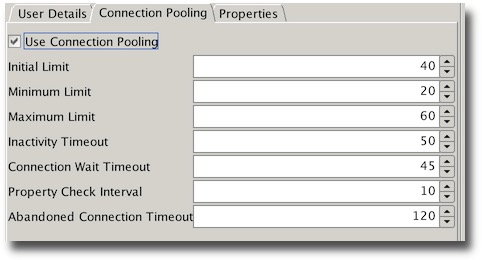
We’ll also need to use connection pooling. The pool definition is only example and should reflect the total number of threads you plan to run with. If you’ve edited the definition in the config file you should end up with something similar to
Or if you modify it via the GUI.
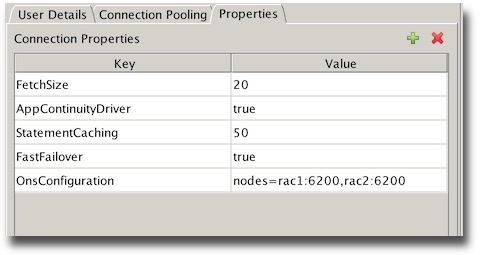
The final step is to enable the application continuity driver and FAN you can again do this in the config file with the following settings
or via the GUI
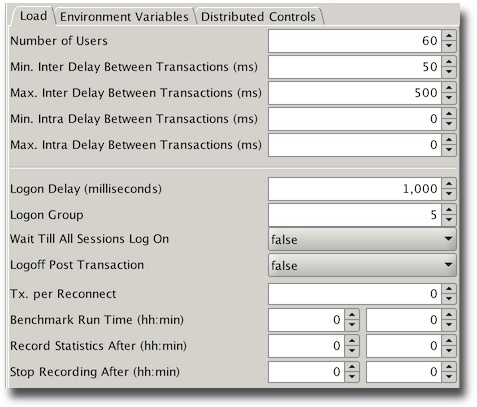
For my test I used the following Load configuration
Or via the GUI
My complete config file is available here for reference
I’d initially suggest running with swingbench to enable the monitoring of errors. Start swingbench
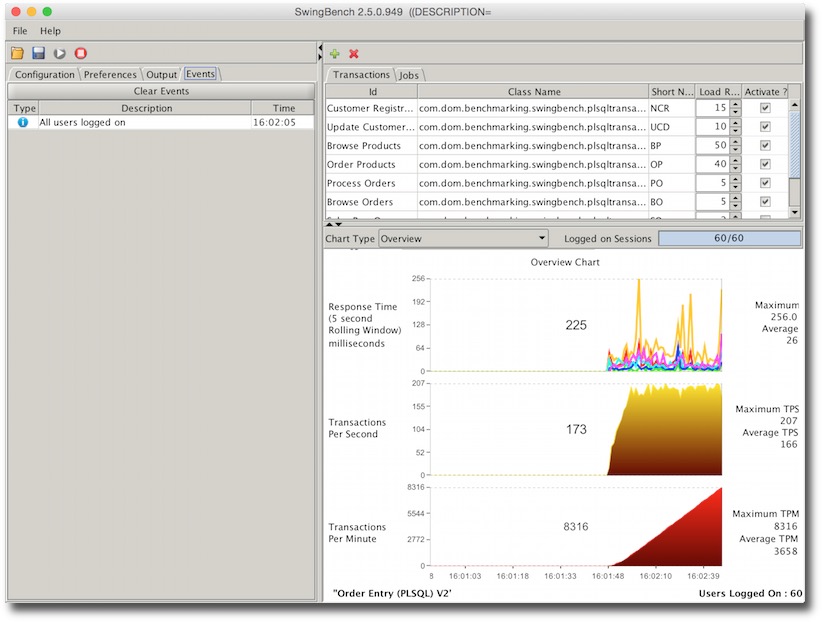
You should see a balanced number of users logged on across your instances. Although though may fluctuate depending on a number of factors.
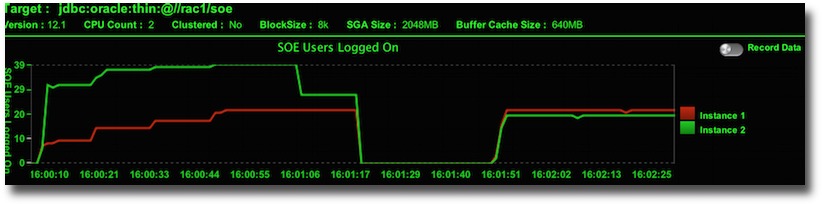
The next step is to cause an unexpected termination of one of the resources. I’d suggest killing PMON i.e.
You should see a little disruption in the TPS as you kill the instance. How long will depend on your RAC configuration and power of machine. The following screen shot is from 2 VMs running on my mac. But the important point is that swingbench won’t get any errors.
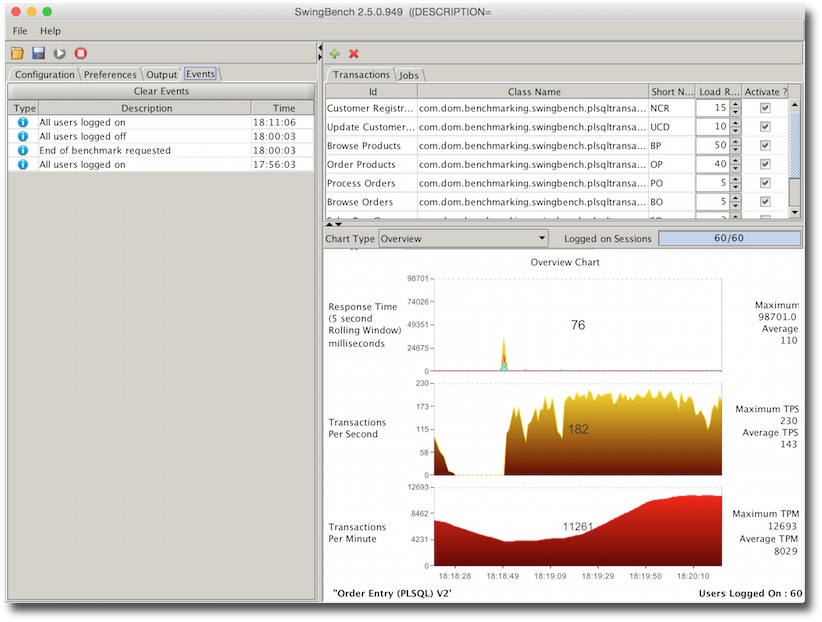
To try and see what happens without application continuity try changing the connect string to point at the non application continuity service.
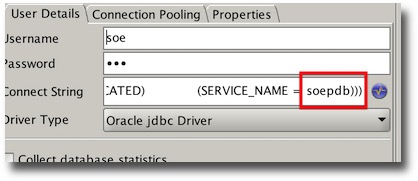
Then delete the property that forces swingbench to use the Application Continuity Driver.
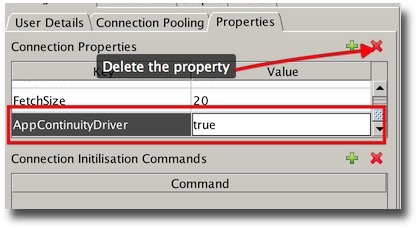
Rerunning and terminating the instance should result in something like this.
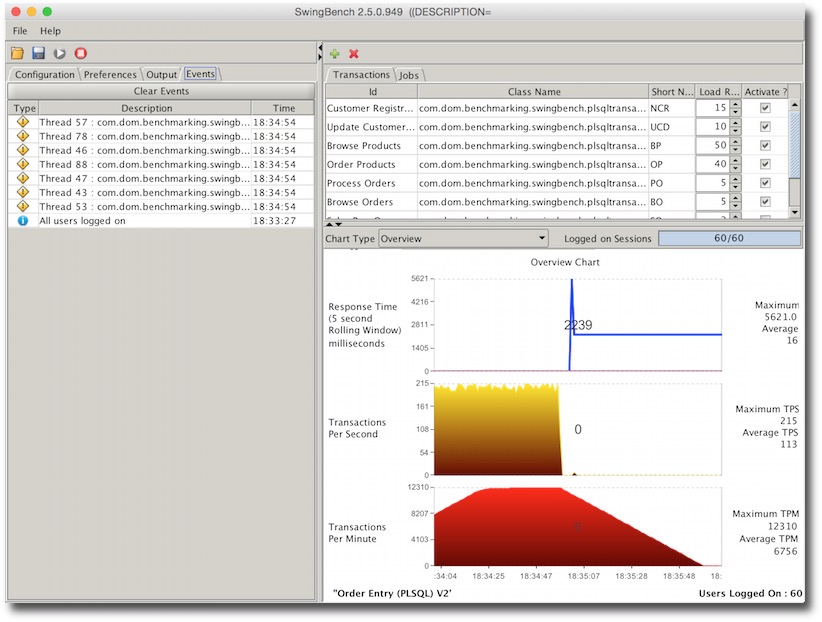
The important point here is the errors which normally an application developer would need to handle without the guarantee of transactions not being applied more than once.
Assumptions
The following assumptions are made
- You have a working Oracle RAC Database 12c ideally running at version 12.1.0.2 (Database and Clusterware)
- You have downloaded the very latest version of swingbench
- You’ve installed the SOE benchmark using the oewizard
- You’re running on a Physical or Virtual Machine (Virtual Box)
- You are using the thin jdbc driver with swingbench
My configuration
In this example I’m using a 2 node RAC cluster for simplicity but I’ve validated the configuration on an 8 node cluster as well. My configuration
OS : Linux 6
Nodes : RAC1, RAC2
SCAN : racscan
CDB : orcl
PDB : soe
schema : soe
So after you’ve confirmed that the soe benchmark has been installed correctly the next step is to define the services. I created two new ones to show the difference between Application Continuity and standard Fast Application Failover. First a non Application Continuity Service
srvctl add service -d orcl -s soepdb -pdb soe -preferred orcl1,orcl2
srvctl modify service -db orcl -service soepdb -failoverdelay 5
srvctl modify service -db orcl -service soepdb -failoverretry  60
srvctl modify service -db orcl -service soepdb -clbgoal SHORT
srvctl modify service -db orcl -service soepdb -rlbgoal SERVICE_TIME
Now a service defined for Application Continuity
srvctl add service -db orcl -service soepdb_ac -commit_outcome TRUE -retention 86400 -preferred orcl1,orcl2
srvctl modify service -db orcl -service soepdb_ac -failovertype TRANSACTION
srvctl modify service -db orcl -service soepdb_ac -failoverdelay 5
srvctl modify service -db orcl -service soepdb_ac -failoverretry  60
srvctl modify service -db orcl -service soepdb_ac -session_state STATIC
srvctl modify service -db orcl -service soepdb_ac -clbgoal SHORT
srvctl modify service -db orcl -service soepdb_ac -rlbgoal SERVICE_TIME
Then grant access to the Application Continuity package to the SOE use
SYS@//rac1/soepdb > GRANT EXECUTE ON DBMS_APP_CONT TO SOE;
And thats it for the database/grid. All we need to do now is to configure swingbench to connect to the services. You can do this either in the command line, swingbench GUI or by editing the config file. The connect string should look similar to this (for application continuity)
(DESCRIPTION=
  (TRANSPORT_CONNECT_TIMEOUT=5)
  (RETRY_COUNT=6)
  (FAILOVER=ON)
  (ADDRESS =
    (PROTOCOL = TCP)
    (HOST = racscan)
    (PORT = 1521)
  )
  (CONNECT_DATA=
    (SERVER = DEDICATED)
    (SERVICE_NAME = soepdb_ac)
  )
)
NOTE : EZConnect strings won’t work for this.
We’ll also need to use connection pooling. The pool definition is only example and should reflect the total number of threads you plan to run with. If you’ve edited the definition in the config file you should end up with something similar to
            40
            20
            60
            50
            45
            10
            120
Or if you modify it via the GUI.
The final step is to enable the application continuity driver and FAN you can again do this in the config file with the following settings
            50
            true
            20
            nodes=rac1:6200,rac2:6200
            true
or via the GUI
For my test I used the following Load configuration
        60
        0
        0
        50
        500
        120
        -1
        0:0
        5
        1000
        false
        false
        0:0
        0:0
        0
Or via the GUI
My complete config file is available here for reference
I’d initially suggest running with swingbench to enable the monitoring of errors. Start swingbench
You should see a balanced number of users logged on across your instances. Although though may fluctuate depending on a number of factors.
The next step is to cause an unexpected termination of one of the resources. I’d suggest killing PMON i.e.
[oracle@rac2 ~]$ ps -def | grep pmon
oracle    4345     1  0 05:00 ?        00:00:00 asm_pmon_+ASM2
oracle   18093     1  0 08:11 ?        00:00:00 ora_pmon_orcl2
oracle   25847  6655  0 08:37 pts/1    00:00:00 grep pmon
[oracle@rac2 ~]$ kill -9 18093
You should see a little disruption in the TPS as you kill the instance. How long will depend on your RAC configuration and power of machine. The following screen shot is from 2 VMs running on my mac. But the important point is that swingbench won’t get any errors.
To try and see what happens without application continuity try changing the connect string to point at the non application continuity service.
Then delete the property that forces swingbench to use the Application Continuity Driver.
Rerunning and terminating the instance should result in something like this.
The important point here is the errors which normally an application developer would need to handle without the guarantee of transactions not being applied more than once.
Ever so slightly embarassing
31/07/14 18:00
Minor driver update to swingbench and dbtimemonitor
30/07/14 12:42
New jdbc drivers for swingbench
23/07/14 12:07
New build of swingbench with improved stats
13/07/14 09:23
I’ve uploaded a new build of swingbench that fixes a number of bugs but also improves on the stats being produced.
One problem with using averages when analysing results is that they hide a multitude of evils. This is particularly true for response times where there are likely to be big skews hidden if just the average is considered. You can see this in the chart below where response times are mapped into 100 buckets. The response time range from 2 to 6274 milliseconds. The average is 257ms.
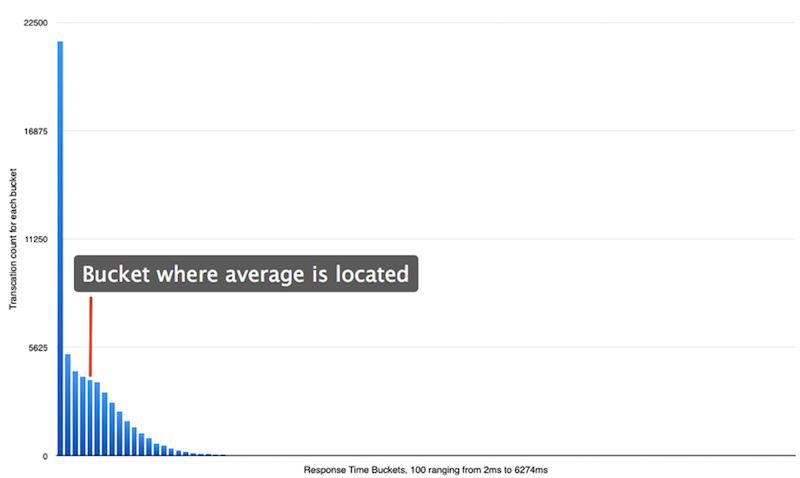
It might be that in many instances the average is adequate for your needs but if your interested in the spread of results and the impact metrics like user counts, IO, memory etc have on the responsiveness of your system it might also be useful to model the spread of response so you can look for outliers.
In the latest build of swingbench when you now specify full stats collection you end up with a more complete set of results as shown below
257.86816475601097 2 6274 117.80819459762236 276.6820016426486 76552.9300329826 7.96379726468569 1.7844202125604447 14 25 43 87 170 257 354 466 636 21495, 5260, 4380, 4084, 3929, 3798, 3266, 2756, 2303, 1801, 1465, 1138, 889, 632, 499, 381, 259, 201, 140, 105, 102, 55, 43, 21, 21, 21, 17, 12, 9, 4, 5, 3, 12, 1, 6, 3, 7, 5, 1, 1, 6, 1, 2, 1, 0, 1, 0, 0, 0, 0, 0, 0, 0, 0, 0, 0, 0, 0, 0, 0, 0, 0, 0, 0, 0, 0, 0, 0, 0, 0, 0, 0, 0, 0, 0, 0, 0, 0, 0, 0, 0, 0, 0, 0, 0, 0, 0, 0, 0, 0, 0, 0, 0, 0, 0, 0, 0, 0, 0, 1 59142 0 0
I’ve included a complete set of percentiles and some additional metrics for consideration (variance, Kurtosis, Skewness, Geometric Mean). Over the coming weeks I’ll be attempting to process a results file into a more useful document.
You can enable stats collection in the UI from the preferences tab i.e.
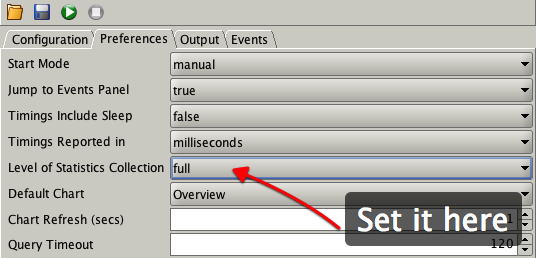
You can also set it from the command line. i.e.
./charbench -bg -s -stats full -rt 0:04 -cs //oracle12c2/orcl -a -uc 25 -com "Test of full stats collection" -intermin 2 -intermax 2 -bs 0:01 -be 0:04 &
One thing to watch out for is that you may need to change the metric that transactions are measure in i.e. from milliseconds to microseconds to model a better spread of response times.
Along side the improvements to stats I’ve also fixed the following
You can download the code front he usual place here
One problem with using averages when analysing results is that they hide a multitude of evils. This is particularly true for response times where there are likely to be big skews hidden if just the average is considered. You can see this in the chart below where response times are mapped into 100 buckets. The response time range from 2 to 6274 milliseconds. The average is 257ms.
It might be that in many instances the average is adequate for your needs but if your interested in the spread of results and the impact metrics like user counts, IO, memory etc have on the responsiveness of your system it might also be useful to model the spread of response so you can look for outliers.
In the latest build of swingbench when you now specify full stats collection you end up with a more complete set of results as shown below
I’ve included a complete set of percentiles and some additional metrics for consideration (variance, Kurtosis, Skewness, Geometric Mean). Over the coming weeks I’ll be attempting to process a results file into a more useful document.
You can enable stats collection in the UI from the preferences tab i.e.
You can also set it from the command line. i.e.
./charbench -bg -s -stats full -rt 0:04 -cs //oracle12c2/orcl -a -uc 25 -com "Test of full stats collection" -intermin 2 -intermax 2 -bs 0:01 -be 0:04 &
One thing to watch out for is that you may need to change the metric that transactions are measure in i.e. from milliseconds to microseconds to model a better spread of response times.
Along side the improvements to stats I’ve also fixed the following
- Fixed windowed stats collection (-be -bs) and full stats (-stats full) working together
- Fixed the -bg (background) option so it works on Solaris
- Numerous stability fixes
You can download the code front he usual place here
New build of swingbench
22/05/14 17:17
I’ve just finished a new build of swingbench and the command line got a little bit of love. I’ve added the following new functionality
The functionality enabling you to background and the changes to the coordinator might need a little more explaining. The idea is that you might want to run up more than one load generator either because you want to create a truly tremendous load you want to run different load generators at different databases. To do this you might want to use a combination of backgrounding the load generators and using the coordinator to start,stop and report on them. For example
$ ./coordinator &$ ./charbench -cs //oracle12c/pdb1 -bg -s -uc 25 -co localhost &$ ./charbench -cs //oracle12c/pdb2 -bg -s -uc 25 -co localhost & $ ./charbench -cs //oracle12c/pdb3 -bg -s -uc 25 -co localhost &$ ./coordinator -runall$ ./coordinator -statsAggregated results for 3 load generatorsUse Ctrl-C to halt stats collection Time Users TPM TPS 17:52:03 75 3898 460 17:52:06 75 5263 483 17:52:09 75 6669 489. . .. . .$./coordinator -stopall$./coordinator -kill
Note : to background charbench you must specify -bg (it indicates the client will no longer be taking input from stdin)
You can download it as usual from here
- Added new transactions to sh benchmark
- Percentiles now report 10th to 90th percentiles instead of just 25th,50th and 75th percentile
- Added a new command line option to allow users to change stats collection target.
- Fixed the command line option “-bg” so it’s possible to background charbench
- Added new commands to coordinator to make it simpler to use
- Changed -stop to -kill to better indicate what it does
- Changed -halt to -stop to indicate what it does
- Added -stopall to stop all attached clients
- Added -runall to start all attached clients
- Added -stats to enable all display aggregated transaction rates of all attached clients
- Included python script to parse the one or more results files into csv format (located in $SWINGHOME/utils)
- forced users to specify either -create, -drop or -generate when specify character mode (-c)
The functionality enabling you to background and the changes to the coordinator might need a little more explaining. The idea is that you might want to run up more than one load generator either because you want to create a truly tremendous load you want to run different load generators at different databases. To do this you might want to use a combination of backgrounding the load generators and using the coordinator to start,stop and report on them. For example
$ ./coordinator &$ ./charbench -cs //oracle12c/pdb1 -bg -s -uc 25 -co localhost &$ ./charbench -cs //oracle12c/pdb2 -bg -s -uc 25 -co localhost & $ ./charbench -cs //oracle12c/pdb3 -bg -s -uc 25 -co localhost &$ ./coordinator -runall$ ./coordinator -statsAggregated results for 3 load generatorsUse Ctrl-C to halt stats collection Time Users TPM TPS 17:52:03 75 3898 460 17:52:06 75 5263 483 17:52:09 75 6669 489. . .. . .$./coordinator -stopall$./coordinator -kill
Note : to background charbench you must specify -bg (it indicates the client will no longer be taking input from stdin)
You can download it as usual from here
Fixes come in thick and fast...
20/11/13 14:15
Yet another fix and some more minor UI changes.
In fixing some code I regressed some basic functionality. In the last build if you restarted a benchmark from within the swingbench and minibench GUI it gave you an error and you had to restart swingbench to get it going again. This is now fixed in this new build.
I also took the time to add some functionality to enable you to specify Inter and Intra sleep times. You can do this in the “Load” tab as shown below
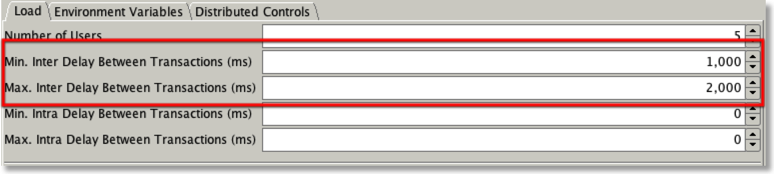
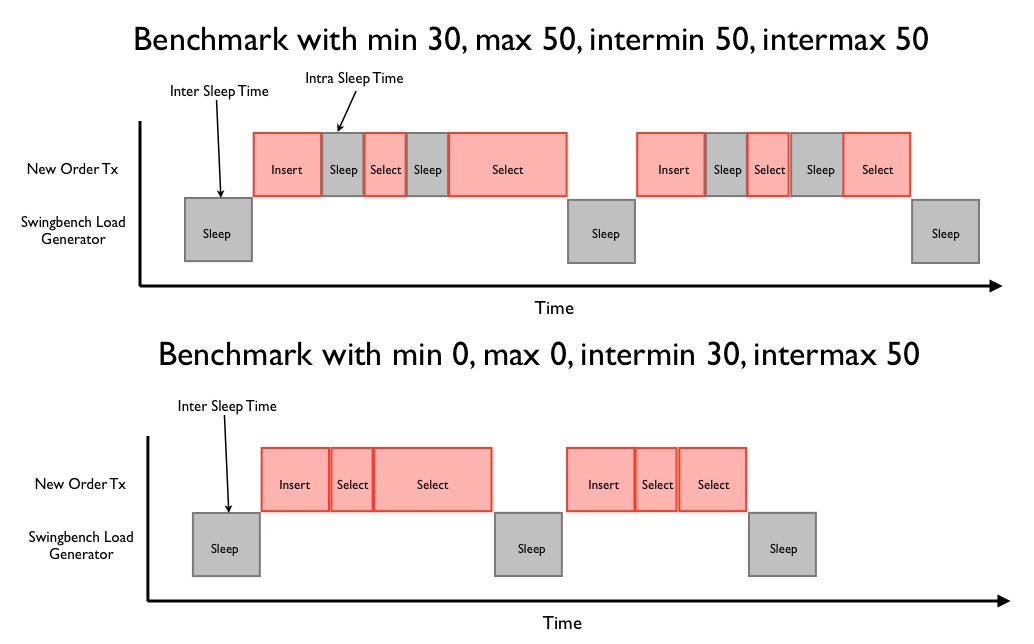
It gives me the opportunity to explain the difference between inter and intra sleep times. As the name implies intra sleep times occur “inside” of a transaction. Inter sleep times occur between transactions. Many of the transactions inside of the swingbench “SOE” have sleep times between DML operations (select, insert, update). In some situations this better emulates what happens in some legacy form based systems, this is what is controlled by intra sleep times. However most systems these days tend to utilise web based front ends where DML operations tend to be fired as a single operation when the user submits a form. This approach results in a more scalable architecture with fewer locks being held and for shorter periods of time. Hopefully the following diagram will explain the differences in a clearer fashion.
You can also set the intra and inter sleep time from the command line with the -min (intra min) -max (intramax) -intermin (inter min) -intermax (inter max).
In fixing some code I regressed some basic functionality. In the last build if you restarted a benchmark from within the swingbench and minibench GUI it gave you an error and you had to restart swingbench to get it going again. This is now fixed in this new build.
I also took the time to add some functionality to enable you to specify Inter and Intra sleep times. You can do this in the “Load” tab as shown below
It gives me the opportunity to explain the difference between inter and intra sleep times. As the name implies intra sleep times occur “inside” of a transaction. Inter sleep times occur between transactions. Many of the transactions inside of the swingbench “SOE” have sleep times between DML operations (select, insert, update). In some situations this better emulates what happens in some legacy form based systems, this is what is controlled by intra sleep times. However most systems these days tend to utilise web based front ends where DML operations tend to be fired as a single operation when the user submits a form. This approach results in a more scalable architecture with fewer locks being held and for shorter periods of time. Hopefully the following diagram will explain the differences in a clearer fashion.
You can also set the intra and inter sleep time from the command line with the -min (intra min) -max (intramax) -intermin (inter min) -intermax (inter max).
First Update to Swingbench 2.5
11/11/13 21:14
Just a small update to swingbench... You can download the new build here
It fixes a few of bugs
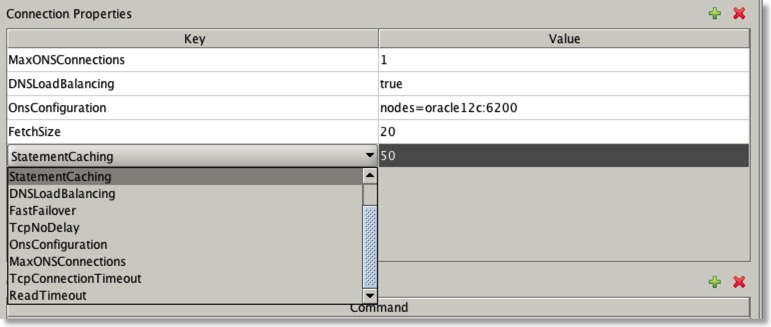
So the next obvious question is “What are all the connection properties and why did it take you so long to tell us?”. I have no idea why it took so long to tell people what they were. Consider it an over sight but let me try and correct that now.
It fixes a few of bugs
- Incorrect partitioning defaults specified in the oewizard and shwizards configuration files
- Incorrect profile of transactions for “sh” benchmark
- “sh” benchmark transaction generated queries for future values that didn’t exist
- Checks not performed on allowed partitioning values in configuration files for wizard when run in command line
So the next obvious question is “What are all the connection properties and why did it take you so long to tell us?”. I have no idea why it took so long to tell people what they were. Consider it an over sight but let me try and correct that now.
| Connection Properties | Description |
| StatementCaching | This specifies the number of statements to be cached. Valid value is an integer |
| DNSLoadBalancing | Force jdbc to connect to more than one scan listener. Valid values are true or false |
| FastFailover | Activate Oracle’s Fast Failover connection functionality. Valid values are true or false |
| TcpNoDelay | Sets TCP_NODELAY of a socket. Valid values are true or false |
| OnsConfiguration | The remote configurations of Oracle Notification Servers (ONS). Valid values are similar to this “nodes=dbserver1:6200,dbserver2:6200”. See Oracle documentation for more details and examples |
| MaxONSConfiguration | The number of ONS servers that jdbc will randomly select from in the advent of a failure. Valid value is an integer |
| TcpConnectionTimeout | The time taken between traversals of an “ADDRESS_LIST” in the advent of a failure. Specified in seconds |
| ReadTimeOut | The time queries wait for results before considering that a failure has occurred. Specified in seconds |
| BatchUpdates | The number of inserts/updates that are grouped together to improve transaction performance. Valid value is an integer |
| FetchSize | Number of rows fetched on each round trip to the database. Valid value is an integer |
Release of Swingbench 2.5
22/10/13 17:14
I’m pleased to announce the release of swingbench 2.5. It has a ton of fixes and new functionality in it but most importantly it has full support for Oracle Database 12c. At this stage I’m going to call it Beta but only because it’s received a limited amount of testing inside of Oracle. Obviously let me know what you think. I’ll try and provide fixes as quickly as possible to any thing you flag up. You can download it here .
Fixes and Enhancements include
Fixes and Enhancements include
- Fixed a bug where the wizards struggled with some time zones.
- Fixed a bug where the init() command wasn't called correctly
- Removed unnecessary stacktrace output when invalid command line parameters are used
- Fixed an integer overflow where some stats were reported incorrectly
- Added normal distribution of data to better model real world data in the OE and SH benchmarks
- Added verbose output (-v) to the wizards when run in command line mode to provide better feedback
- Increased the maximum heap use by oewizard and shwizard to 2GB in size
- Updated launch parameters for java to set min and max to avoid unnecessary memory consumption
- Users can now define their own output date format mask for charbench via a swingbench environment variable (see FAQ)
- Wizards in graphical mode now display a warning before data generation if there isn't enough temporary space to generate indexes
- Wizards in graphical mode now display the reason they can't connect to the database
- Generated data is more representative of real world formats
- Charts in overview now display values when moused over
- Support of backgrounding charbench, Unix/Linux only. requires the use of both the -bg swinbench option and "&" operator
- Fixes and improvements to error suppression
- The maximum number of soft partitions that can be specified is limited to 48. Values larger than this cause severe performance degradation. This is being looked into.
- Version 2.0 of the OE benchmark is included (selectable from the wizard).
- Wizards allow you to specify index, compression and partitioning models where supported (command line and GUI)
- All scripts and variables used by wizards are listed in the configuration file
- Benchmark version can be specified on the command line
- Fixed an issue where specifying max Y values in charts was ignored
- Support for choosing whether commits are executed client or server side in the SOE Benchmark -D CommitClientSide=true
- Wizards recommend a default size for the benchmarks based on the size of the SGA
- The customers and supplementary_demographics table are now range partitioned in the SH schema if the range portioned option is specified
- New overview chart parameter (config file only)
allows you specify what YValue a chart will start at - Wizards allow the creation of schemas with or without indexes
- The sh schema now allows a partitioned or non partitioned schema
- Updated XML infrastructure
- Removed unneeded libraries and reduced size of distribution
- Errors in transactions can now be reported via the -v errs command line option
- Tidied up error reporting. Errors should be reported without exception stacks unless running in debug mode
- Fixed a problem where it wasn't possible to restart a benchmark run when using connection pooling
Using the wizards in comand line mode
15/07/13 16:21
I’ve just been reminded that not everybody knows that you can run swingbench in command line mode to use nearly all of it’s functionality. Whilst VNC means that you can use the graphical front end for most operations sometimes you need a little more flexibility. One area that this is particularly useful is when you’re creating large benchmark schemas for the SOE and SH benchmarks via the wizards (oewizard, shwizard). To find out what commands you can use just use the “-h” option. As you can see below there’s access to nearly all of the parameters (and a few more) that are available in the graphical user interface.
Using these parameters its possible to specify a complete install and drop operation from the command line. For example
This will create a 10 GB (Data) schema using 32 threads, use no partitioning and use the soe schema.
You can drop the same schema with the following command
I use this approach to create lots of schemas to automate some form of testing… The following enables me to create lots of schemas to analyse how the SOE benchmark performs as the size of the data set and index increase.
./oewizard -scale 5 -cs //oracle12c/orcl -dbap manager -ts SOE5 -tc 32 -nopart -u soe5 -p soe5 -cl -df /home/oracle/app/oracle/oradata/ORCL/datafile/soe5.dbf
./oewizard -scale 10 -cs //oracle12c/orcl -dbap manager -ts SOE10 -tc 32 -nopart -u soe10 -p soe10 -cl -df /home/oracle/app/oracle/oradata/ORCL/datafile/soe10.dbf
./oewizard -scale 20 -cs //oracle12c/orcl -dbap manager -ts SOE20 -tc 32 -nopart -u soe20 -p soe20 -cl -df /home/oracle/app/oracle/oradata/ORCL/datafile/soe20.dbf
./oewizard -scale 40 -cs //oracle12c/orcl -dbap manager -ts SOE40 -tc 32 -nopart -u soe40 -p soe40 -cl -df /home/oracle/app/oracle/oradata/ORCL/datafile/soe40.dbf
./oewizard -scale 80 -cs //oracle12c/orcl -dbap manager -ts SOE80 -tc 32 -nopart -u soe80 -p soe80 -cl -df /home/oracle/app/oracle/oradata/ORCL/datafile/soe80.dbf
usage: parameters:
-allindexes build all indexes for schema
-bigfile use big file tablespaces
-cwizard config file
-cl run in character mode
-compositepart use a composite paritioning model if it exisits
-compress use default compression model if it exists
-create create benchmarks schema
-csconnectring for database
-dbadba username for schema creation
-dbappassword for schema creation
-debug turn on debugging output
-debugf turn on debugging output to file (debug.log)
-dfdatafile name used to create schema in
-drop drop benchmarks schema
-dtdriver type (oci|thin)
-g run in graphical mode (default)
-generate generate data for benchmark if available
-h,--help print this message
-hashpart use hash paritioning model if it exists
-hcccompress use HCC compression if it exisits
-nocompress don't use any database compression
-noindexes don't build any indexes for schema
-nopart don't use any database partitioning
-normalfile use normal file tablespaces
-oltpcompress use OLTP compression if it exisits
-ppassword for benchmark schema
-part use default paritioning model if it exists
-pkindexes only create primary keys for schema
-rangepart use a range paritioning model if it exisits
-s run in silent mode
-scalemulitiplier for default config
-spthe number of softparitions used. Defaults to cpu
count
-tcthe number of threads(parallelism) used to
generate data. Defaults to cpus*2
-tstablespace to create schema in
-uusername for benchmark schema
-v run in verbose mode when running from command
line
-versionversion of the benchmark to run
Using these parameters its possible to specify a complete install and drop operation from the command line. For example
./oewizard -scale 10 -cs //oracle12c/orcl -dbap manager -ts SOE -tc 32 -nopart -u soe -p soe -cl -df /home/oracle/app/oracle/oradata/ORCL/datafile/soe.dbf
This will create a 10 GB (Data) schema using 32 threads, use no partitioning and use the soe schema.
You can drop the same schema with the following command
./oewizard -scale 0.1 -cs //oracle12c/orcl -dbap manager -ts SOE -u soe -p soe -cl -drop
I use this approach to create lots of schemas to automate some form of testing… The following enables me to create lots of schemas to analyse how the SOE benchmark performs as the size of the data set and index increase.
./oewizard -scale 1 -cs //oracle12c/orcl -dbap manager -ts SOE1 -tc 32 -nopart -u soe1 -p soe1 -cl -df /home/oracle/app/oracle/oradata/ORCL/datafile/soe1.dbf
./oewizard -scale 5 -cs //oracle12c/orcl -dbap manager -ts SOE5 -tc 32 -nopart -u soe5 -p soe5 -cl -df /home/oracle/app/oracle/oradata/ORCL/datafile/soe5.dbf
./oewizard -scale 10 -cs //oracle12c/orcl -dbap manager -ts SOE10 -tc 32 -nopart -u soe10 -p soe10 -cl -df /home/oracle/app/oracle/oradata/ORCL/datafile/soe10.dbf
./oewizard -scale 20 -cs //oracle12c/orcl -dbap manager -ts SOE20 -tc 32 -nopart -u soe20 -p soe20 -cl -df /home/oracle/app/oracle/oradata/ORCL/datafile/soe20.dbf
./oewizard -scale 40 -cs //oracle12c/orcl -dbap manager -ts SOE40 -tc 32 -nopart -u soe40 -p soe40 -cl -df /home/oracle/app/oracle/oradata/ORCL/datafile/soe40.dbf
./oewizard -scale 80 -cs //oracle12c/orcl -dbap manager -ts SOE80 -tc 32 -nopart -u soe80 -p soe80 -cl -df /home/oracle/app/oracle/oradata/ORCL/datafile/soe80.dbf
Changing java libraries and increasing the heap size used by swingbench
15/01/12 11:57
I’ve been asked a couple of times recently about how to change the infrastructure libraries i.e. the Oracle jdbc driver. I try to always ship the latest jdbc/ons/ucp libraries but its possible that Oracle may realease a patch set whilst I’m working on something else. Its also possible people may want to investigate a bug or performance problem by trying out a selection of drivers. To change the jar files all that is needed is to move the old version out of the lib directory and copy the new one in, for example
$> cd swingbench$> mv lib/ojdbc6.jar ~/backup/ojdbc6.jar$> cp ~/newjdbc/ojcbc6.jar lib
Don’t try and keep multiple versions of the same driver in the lib directory. It can lead to unexpected results. When swingbench starts it looks in the lib directory for all the libraries (contained in the jar files) to use.
If you need to increase the amount of memory used by swingbench you need to edit a file called launcher.xml in the launcher directory. You might need to do this if you are planning to run with many thousands of threads. You need to changed the default value (1024m) to a larger one. For example
to something like
$> cd swingbench$> mv lib/ojdbc6.jar ~/backup/ojdbc6.jar$> cp ~/newjdbc/ojcbc6.jar lib
Don’t try and keep multiple versions of the same driver in the lib directory. It can lead to unexpected results. When swingbench starts it looks in the lib directory for all the libraries (contained in the jar files) to use.
If you need to increase the amount of memory used by swingbench you need to edit a file called launcher.xml in the launcher directory. You might need to do this if you are planning to run with many thousands of threads. You need to changed the default value (1024m) to a larger one. For example
to something like
New build of swingbench 2.4
08/12/11 19:56
I’ve just uploaded a new build of swingbench with the following fixes
You can find it here. Let me know if you find any problems.
- Wizard now writes output to debug.log correctly with the -debugFile option
- Fixed bug where partitioning was always installed regardless. This meant the wizards couldn't install against a standard edition database
- Fixed a bug where swingbench wouldn't start unless all users were able to log on. Swingbench will now start when it has logged on as many users as it can.
- Fixed a bug where users were incorrectly counted as being logged on
- Fixed a bug where logging wasn't correctly written to a debug file
- Changed -debugFile to -debugf to provide consistency with other tools
- Changed to way users logged on is reported in verbose mode of charbench
- Updated the secure shell libraries to support Solaris 11
You can find it here. Let me know if you find any problems.
2.4 makes it to stable status
08/11/11 16:02
At last I feel that I’ve fixed enough bugs and had enough feed back to change 2.4 to stable status. This means that this should be the default client most groups use. Based on the feedback I get I’ll remove 2.3 from the downloads page.
There has been a few changes in this release. These include
The new Overview chart is show below
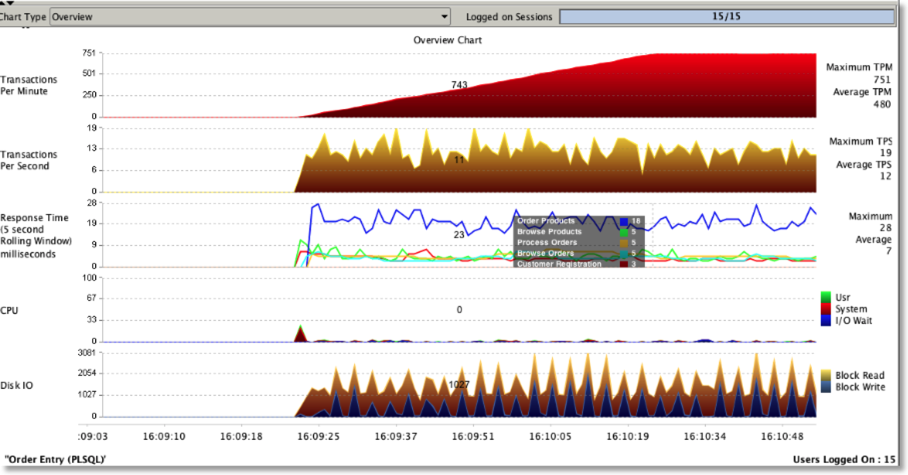
As per usual you can download it here
There has been a few changes in this release. These include
- Improvements to the Overviewchart to provide dynamic YXAxis and floating legends
- The overview chart now uses a 5 second rolling window for response time metrics as opposed to a meaningless average
- “Minibench” has been made a little bigger

- Numerous fixes to the wizards
- Numerous fixes to Universal Connection Pooling
- New command line options
The new Overview chart is show below
As per usual you can download it here
New Build of swingbench 2.4
06/05/11 18:43
It’s been 2 or 3 months since the last drop of swingbench and so it will come as no surprise that I’ve released another build. This release features
- Fix to enable the jdbc version of the SOE benchmark to work without errors. I’ll be updating it over the coming week to try and make it as close as possible to the PL/SQL version
- A new parameter (and UI change) to support the disconnect/connection of sessions after a fixed number of transactions
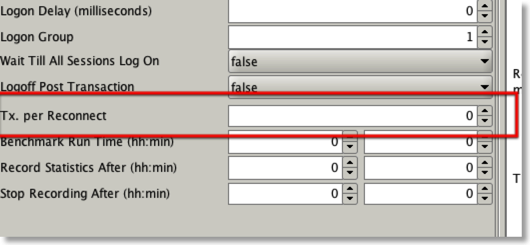
- Various fixes
New build of swingbench 2.4
15/02/11 10:22
I’ve just uploaded a new build of swingbench 2.4 it has a number of bug fixes which sort out some of the following issues
You can download it here
Let me know if you have any problems via the comment page
- Unexpected termination due to driver issues
- Unclear timeline text on the overview chart
- Numerous UI and java issues
You can download it here
Let me know if you have any problems via the comment page
New build of Swingbench
31/08/10 16:22
After a bit of a delay Im releasing a new build of swingbench. It has a large number of fixes reflected in the difference in build numbers. Some of the changes include
The new report looks like this
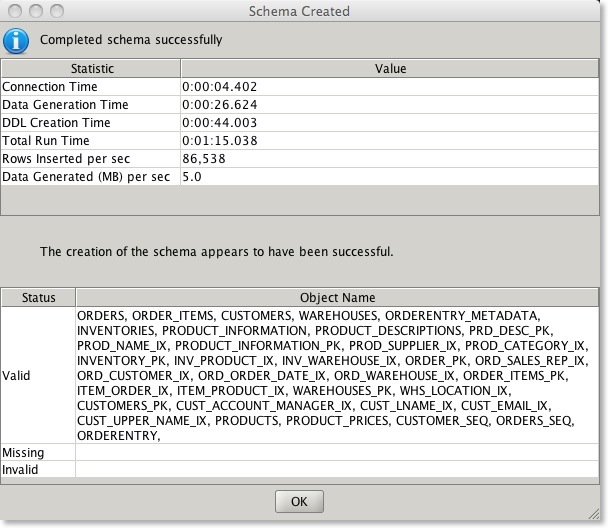
Im hoping it should make it easier to understand if a install worked correctly.
You can download the new build here. As usual let me know if it hangs together.
- A new report at the end of wizard driven install that details the speed of the install but also whether the objects that have been created are valid
- A fix to clusteroverview that prevented it starting
- A fix to the cpumonitor that prevented it from running in some instances
- Some icon changes
- Warning and error alerts are now fired inside of the wizard to highlight potential issues
- Fix that prevented install logs being saved
- Average response time can now be displayed in command line mode
- Removed the required to run the wizards in headless mode
- Fixed numerous UCP issues
- Many other fixes
The new report looks like this
Im hoping it should make it easier to understand if a install worked correctly.
You can download the new build here. As usual let me know if it hangs together.
Minor update to swingbench
24/05/10 15:35
And another update to 2.4...
13/05/10 20:45
Update to swingbench 2.4
15/04/10 21:05
I’ve updated swingbench to build 628 which includes the following fixes
- Updates to the “order entry” benchmark
- Wizards now use user selected thread count
- Swingbench now correctly loads new config files from the menu
- Feedback on wizard builds (metrics such as MB/sec generated etc)
- Checks at start and end of wizard builds
- New benchmark run summaries
Large SOE builds... things to watch for
25/03/10 10:57
A couple of things to watch for if you are building a large SOE schema. The first is temp space. I guess its obvious but if you are building a 1TB schema with 100GB+ tables the indexes are going to be pretty big as well. If you are creating big indexes you need plenty of TEMP. The number of schema’s I’ve looked at that haven’t had their indexes build is amazing. I guess this is partly my fault as well. I’ll include a start and end validation process in the next build. Should have done this before but I guess people weren’t building such big schema’s
As a guide line for a schema of size “x” I’d have at least “x/6” worth of temp space i.e. 1TB schema needs about 180GB of temp. You can resize it after the build to what ever you decide is appropriate.
As to what it should look like on completion... well something like this
SOE@//localhost/orcl > @tables;Tables======Table Rows Blocks Size Compression Indexes Partitions Analyzed-------------------- ---------- ----- ------ ----------- ------- ---------- ----------WAREHOUSES 1,000 60 1024k Disabled 2 0 < WeekORDERS 225,000 1,636 13M Disabled 5 0 < WeekINVENTORIES 924,859 10,996 87M Disabled 3 0 < WeekORDER_ITEMS 587,151 2,392 19M Disabled 3 0 < WeekPRODUCT_DESCRIPTIONS 1,000 60 1024k Disabled 2 0 < WeekLOGON 50,000 250 2M Disabled 0 0 < WeekPRODUCT_INFORMATION 1,000 60 1024k Disabled 3 0 < WeekCUSTOMERS 200,000 2,014 16M Disabled 5 0 < Week
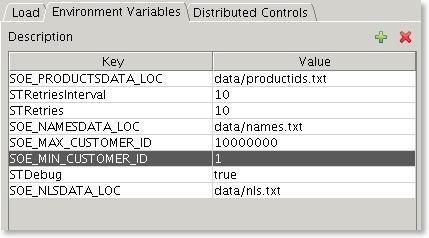
Another really important thing is to include the SOE_MIN_CUSTOMER_ID and SOE_MAX_CUSTOMER_ID in the environment variables within the config file. This will reduce the startup time of the benchmark. Follow the instructions below or edit the config file
Select the Environment Variables tab and press the button (you’ll need to do this for each environment variable).

Add two Enviroment variables
You can determine what thes values are by running a piece of SQL similar to this when logged into the SOE schema
SELECT /*+ PARALLEL(CUSTOMERS, 8) */ MIN(customer_id) SOE_MIN_CUSTOMER_ID, MAX(customer_id) SOE_MAX_CUSTOMER_ID FROM customers
After adding the variables you should end up with something that looks similar to this
As a guide line for a schema of size “x” I’d have at least “x/6” worth of temp space i.e. 1TB schema needs about 180GB of temp. You can resize it after the build to what ever you decide is appropriate.
As to what it should look like on completion... well something like this
SOE@//localhost/orcl > @tables;Tables======Table Rows Blocks Size Compression Indexes Partitions Analyzed-------------------- ---------- ----- ------ ----------- ------- ---------- ----------WAREHOUSES 1,000 60 1024k Disabled 2 0 < WeekORDERS 225,000 1,636 13M Disabled 5 0 < WeekINVENTORIES 924,859 10,996 87M Disabled 3 0 < WeekORDER_ITEMS 587,151 2,392 19M Disabled 3 0 < WeekPRODUCT_DESCRIPTIONS 1,000 60 1024k Disabled 2 0 < WeekLOGON 50,000 250 2M Disabled 0 0 < WeekPRODUCT_INFORMATION 1,000 60 1024k Disabled 3 0 < WeekCUSTOMERS 200,000 2,014 16M Disabled 5 0 < Week
Another really important thing is to include the SOE_MIN_CUSTOMER_ID and SOE_MAX_CUSTOMER_ID in the environment variables within the config file. This will reduce the startup time of the benchmark. Follow the instructions below or edit the config file
Select the Environment Variables tab and press the
button (you’ll need to do this for each environment variable).Add two Enviroment variables
- SOE_MIN_CUSTOMER_ID : The value equals the smallest customer id in the data set, usually 1
- SOE_MAX_CUSTOMER_ID : The largerst customer id found in the data set
You can determine what thes values are by running a piece of SQL similar to this when logged into the SOE schema
SELECT /*+ PARALLEL(CUSTOMERS, 8) */ MIN(customer_id) SOE_MIN_CUSTOMER_ID, MAX(customer_id) SOE_MAX_CUSTOMER_ID FROM customers
After adding the variables you should end up with something that looks similar to this
Swingbench 2.4 Beta Released
23/03/10 20:03
I may regret this but it all seems to hang togther so I’ve decided to release 2.4 of swingbench. It dosen’t look significantly different from 2.3 but it has enough changes to warrant a point change. These include....
The other big change is that I’’ve tried to standardise the benchmarks. You can now choose between 1GB,10GB,100GB or 1TB. The thing to watch out for is that this refers to the raw data size. The indexes add to this quite considerably. So a 1TB will require 3.2TB of disk space. The good news is that they are massively multi threaded now and so if you have the horse power (plenty of CPUs and IO) they should build relatively quickly (12 hours for a 1TB benchmark).
I’ve also updated the look of the overview graphs to make them a little punchier... I’ll be improving them still further shortly.
So now the stuff that’s a little broken....
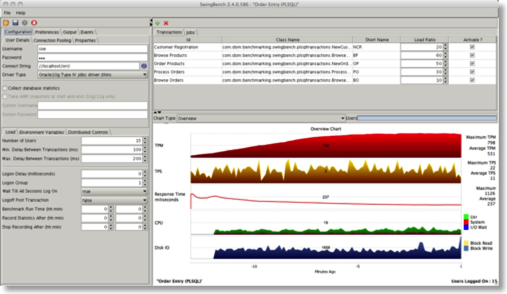
- New SH wizard
- New highly threaded benchmark builds for the OE and SH benchmarks
- New standard sizings for SOE and SH (1GB,10GB,100GB,1TB)
- Improved scalability of the SOE benchmark
- Oracle UCP connections
- New CPU monitor architecture (uses ssh instead of agent)
- Update look and feel on Overview charts (more coming)
- Configuration free install (Simply ensure Java is your path)
The other big change is that I’’ve tried to standardise the benchmarks. You can now choose between 1GB,10GB,100GB or 1TB. The thing to watch out for is that this refers to the raw data size. The indexes add to this quite considerably. So a 1TB will require 3.2TB of disk space. The good news is that they are massively multi threaded now and so if you have the horse power (plenty of CPUs and IO) they should build relatively quickly (12 hours for a 1TB benchmark).
I’ve also updated the look of the overview graphs to make them a little punchier... I’ll be improving them still further shortly.
So now the stuff that’s a little broken....
- Charbench’s interactive mode seems to have cracked under the weight of all the updates. I have a fix for it but it requires a 1.6 JVM and Im trying to figure out if I can port it to 1.5. In the mean time you’ll have to use timers (-rt option) until I have a workable fix.
- Backgrounding tasks seems to be a little broken as well... I hope to have a fix for this shortly.
- An end of run benchmark report. I’ve got it sort of working but it’s a little awkward looking.
- Update to coodinator controls...
- AIX cpu monitoring... I have the code. It just needs testing.
New build of swingbench
23/06/09 21:29
I’ve uploaded a new build of swingbench 422 to the website, I’d recommend upgrading to this build its pretty stable and includes a lot of bug fixes. It includes some new functionality relating to specifying window sizes and positions for minibench and clusteroverview. This means its now possible to maximise the real estate used by swingbench without having to move things around after you’ve started it up. The following example illustrates what’s possible.
./coordinator -g &sleep 2./minibench -co localhost -cm -pos 0,0 -dim 500,400 -min 300 -max 800 -a -cs //node1/rac1 -g RAC1 &./minibench -co localhost -cm -pos 500,0 -dim 500,400 -min 300 -max 800 -a -cs //node2/rac2 -g RAC2 &./minibench -co localhost -cm -pos 0,400 -dim 500,400 -min 300 -max 800 -a -cs //node3/rac3 -g RAC3 &./minibench -co localhost -cm -pos 500,400 -dim 500,400 -min 300 -max 800 -a -cs //node4/rac4 -g RAC4 &sleep 2./clusteroverview -pos 1000,0 -dim 400,800
This script start swingbench in graphical mode, sleeps to let it start, then starts 4 minibenches at different postions on the screen. The new “-cm” maximises minibench’s charts. The rest of the parameters describe what database they are connecting to and what load group they are in. The script then sleeps for 2 seconds before starting clusteroverview in a specific position. You end up with some thing that looks like this
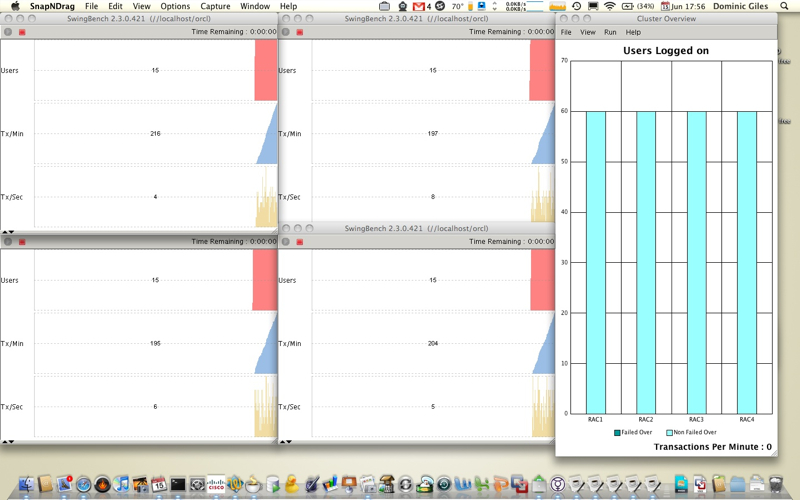
Hope you find this useful. I intend to shortly publish a new webcast on how to set up and use clusteroverview.
./coordinator -g &sleep 2./minibench -co localhost -cm -pos 0,0 -dim 500,400 -min 300 -max 800 -a -cs //node1/rac1 -g RAC1 &./minibench -co localhost -cm -pos 500,0 -dim 500,400 -min 300 -max 800 -a -cs //node2/rac2 -g RAC2 &./minibench -co localhost -cm -pos 0,400 -dim 500,400 -min 300 -max 800 -a -cs //node3/rac3 -g RAC3 &./minibench -co localhost -cm -pos 500,400 -dim 500,400 -min 300 -max 800 -a -cs //node4/rac4 -g RAC4 &sleep 2./clusteroverview -pos 1000,0 -dim 400,800
This script start swingbench in graphical mode, sleeps to let it start, then starts 4 minibenches at different postions on the screen. The new “-cm” maximises minibench’s charts. The rest of the parameters describe what database they are connecting to and what load group they are in. The script then sleeps for 2 seconds before starting clusteroverview in a specific position. You end up with some thing that looks like this
Hope you find this useful. I intend to shortly publish a new webcast on how to set up and use clusteroverview.
New Datagenerator Screencast
29/05/09 16:23
New Swingbench Screencast
24/04/09 20:06
I’ve just uploaded a new screen cast on defining your own transactions, I get asked a lot of questions about it. I’ve also updated the website to enable me to do more of them quicker. I enjoy doing them I hope they help you.
Happy New Year... and a fix to datagenerator
09/01/09 19:02
Sorry for the delay... My DSL router has been bust for the last week and so Im behind in everything.
So first things first.... Happy new year.
Second I’ve uploaded a new build of datagenerator it appears that I had a broken link in the last build. This new version fixes a few minor bugs with dates. You can find it in the usual place here
Thirdly stick with me over the coming months I’ve got a big workload (my proper job) on at present and Im going to have to squeeze everything else in when I can. So this means delays in bug fixes and doc. Sorry.
Dom
So first things first.... Happy new year.
Second I’ve uploaded a new build of datagenerator it appears that I had a broken link in the last build. This new version fixes a few minor bugs with dates. You can find it in the usual place here
Thirdly stick with me over the coming months I’ve got a big workload (my proper job) on at present and Im going to have to squeeze everything else in when I can. So this means delays in bug fixes and doc. Sorry.
Dom
Datagenerator Fix
19/12/08 11:20
Broken clusteroverview in later builds
17/10/08 17:43
It appears that I’ve broken some of the functionality in clusteroverview in the latest builds... In particular the scalability portion and the reporting of CPU.
I’ll fix this and get a new build out ASAP.
Apologies
Dom
I’ll fix this and get a new build out ASAP.
Apologies
Dom
Flash version of the screencast now available
05/10/08 15:49
I’ve just upload a flash version of the walkthrough screencast. Hope this helps the Linux users.
New builds of swingbench and datagenerator
01/10/08 16:38
New Swingbench Screencast
01/10/08 16:36
Datagenerator 0.4
02/09/08 20:09
I've uploaded a new build of datagenerator. New features include
The new build can be downloaded here
I’ve also updated the install, and added some additional walk throughs (in the swingbench section)
Lets go through some of the new features in a little more detail.
You can now include indexes and sequences inside of a datagenerator definition
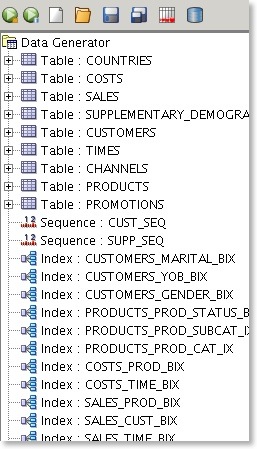
This makes it easy to build an entire schema for a benchmark run removing the need to run additional scripts afterwards. Currently I don't support their reverse engineering but that will come.
Previously it was possible to specify multiple threads for a datageneration run but each table was allocated a single thread. In this version a user can soft partition a table and hence break the build into smaller units which can each have a thread allocated to them.
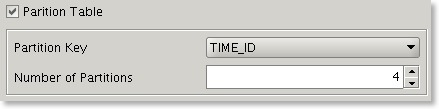
This means that if you have a 32 CPU server you'll be able to build a 10 billion row table much faster if you soft partition the table into 32 units and allocate 32 threads for the build. The partition key can be either a date or number. This is also useful to avoid resource contention when inserting data into a partitioned table.
Its now possible to run the entire data generation to file or database from the command line. These include
[dgiles@macbook bin]$ ./datagenerator -h
usage: parameters:
-async perform async commits
-bs batch size of inserts (defaults to 50)
-c specify config file
-cl use command line interface
-commit number of inserts between commits
-cs connectring for database insertion
-d output directory (defaults to "data")
-db write data direct to database
-ddl just generate the ddl to be used
-debug turn on debug information
-dt driver type (oci|thin)
-f write data to file
-g use graphical user interface
-h,--help print this message
-ni don't create any indexes after data creation
-nodrop don't drop tables if they exist
-p password for database insertion
-s run silent
-scale mulitiplier for default config
-tc number of generation threads (defaults to 2)
-u username for database insertion
-z compress the results file
The config files for the soe and sh schema are now by default configured for a 1GB build. These can be scaled up by using the -scale option. To build a 100GB sh schema the following command can be used.
./datagenerator -c sh.xml -cl -scale 100
This functionality is supplemented by a new flag on a table definition.
Only tables with this flag enabled will be scaled up.
It is now possible to use the row count of a table as the maximum value of a number generator. This is useful when scaling up/down a datageneration and maintaining data coverage and referential integrity.

As the number of rows in the referenced table increase so does the the maximum value of the data generator.
This build supports the use of asynchronous commits. This results in performance increases of about 10-30% when this option is enabled. I’ve also undergone several database
It is sometimes useful to only create the DDL that will used to create tables and indexes.

The files that are created can be edited and modified to include additional information such as storage definitions.
- Support for indexes and sequences
- New command line options
- Better multi threading support
- New scaleable data builds
- Number generators can reference row counts from other tables
- Better database performance
- Ability to generate only the DDL of a schema
- Numerous bug fixes
The new build can be downloaded here
I’ve also updated the install, and added some additional walk throughs (in the swingbench section)
Lets go through some of the new features in a little more detail.
Indexes and Sequences
You can now include indexes and sequences inside of a datagenerator definition
This makes it easy to build an entire schema for a benchmark run removing the need to run additional scripts afterwards. Currently I don't support their reverse engineering but that will come.
Better multithreading support
Previously it was possible to specify multiple threads for a datageneration run but each table was allocated a single thread. In this version a user can soft partition a table and hence break the build into smaller units which can each have a thread allocated to them.
This means that if you have a 32 CPU server you'll be able to build a 10 billion row table much faster if you soft partition the table into 32 units and allocate 32 threads for the build. The partition key can be either a date or number. This is also useful to avoid resource contention when inserting data into a partitioned table.
New command line options
Its now possible to run the entire data generation to file or database from the command line. These include
[dgiles@macbook bin]$ ./datagenerator -h
usage: parameters:
-async perform async commits
-bs
-c
-cl use command line interface
-commit
-cs connectring for database insertion
-d
-db write data direct to database
-ddl just generate the ddl to be used
-debug turn on debug information
-dt driver type (oci|thin)
-f write data to file
-g use graphical user interface
-h,--help print this message
-ni don't create any indexes after data creation
-nodrop don't drop tables if they exist
-p password for database insertion
-s run silent
-scale
-tc number of generation threads (defaults to 2)
-u username for database insertion
-z compress the results file
Scaleable data builds
The config files for the soe and sh schema are now by default configured for a 1GB build. These can be scaled up by using the -scale option. To build a 100GB sh schema the following command can be used.
./datagenerator -c sh.xml -cl -scale 100
This functionality is supplemented by a new flag on a table definition.
Only tables with this flag enabled will be scaled up.
Referenceable row counts
It is now possible to use the row count of a table as the maximum value of a number generator. This is useful when scaling up/down a datageneration and maintaining data coverage and referential integrity.
As the number of rows in the referenced table increase so does the the maximum value of the data generator.
Better database performance
This build supports the use of asynchronous commits. This results in performance increases of about 10-30% when this option is enabled. I’ve also undergone several database
Generate only DDL
It is sometimes useful to only create the DDL that will used to create tables and indexes.
The files that are created can be edited and modified to include additional information such as storage definitions.
New build and fixes in swingbench
22/07/08 12:29
Minor update to datagenerator
29/03/08 11:01
Just a minor update to datagenerator to fix some scripts and config files. There's also a few fixes to the code.
Swingbench with AWR support
25/03/08 21:25
Im uploading a new build of swingbench that includes support for performing AWR snaps at the start and end of of a benchmark run.
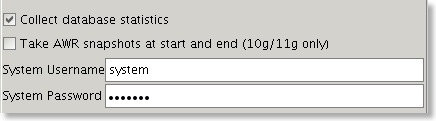
This is a common request and automates a task that a lot of people do. I've also included a new section in the stats that are generated which lists the top 10 (11 to be exact if you include CPU) wait events for a run if you choose to collect database statistics.
I've had a lot of requests about 9i support in swingbench which I appear to have broken. Can you let me know if you still think this is important (I guess its implied by the requests I've had). I need to know whether to focus on this of finish the 2.3 doc.
I'd also appreciate if you could let me know if the wait events I report are in line with the stats you get from ARW... if they're not its down to me not AWR.
Thanks...
This is a common request and automates a task that a lot of people do. I've also included a new section in the stats that are generated which lists the top 10 (11 to be exact if you include CPU) wait events for a run if you choose to collect database statistics.
I've had a lot of requests about 9i support in swingbench which I appear to have broken. Can you let me know if you still think this is important (I guess its implied by the requests I've had). I need to know whether to focus on this of finish the 2.3 doc.
I'd also appreciate if you could let me know if the wait events I report are in line with the stats you get from ARW... if they're not its down to me not AWR.
Thanks...
New build of swingbench 2.3
12/02/08 12:22
I know things have been a little slow of late in terms of the releases of code but I've just had too much on both at work and at home. The good news is that I've found time to squeeze in a new build of swingbench. This has a number of bug fixes in and the following new functionality.
I've also included a walk through of how to set up clusteroverview in 2.3 with the new GroupID functionality, you can find it here.
Any problems report them through the usual channels...
- Clusteroverview now uses the groupID attribute to determine members of a load generation group. This provides a lot more flexibility for clusteroverview to be used to test technologies such as Oracle Dataguard
- The output from the command line option -v can now be directed to a named file with the -vo option
I've also included a walk through of how to set up clusteroverview in 2.3 with the new GroupID functionality, you can find it here.
Any problems report them through the usual channels...
Lets try that again
15/11/07 20:25
New build of swingbench (Build 341)
13/11/07 12:03
Okay... Whilst this is mostly a bug fix release.... and thanks for those who are sending them in.... more welcome 
I introduced two new piece's of functionality eek.... sorry.
The first enables to choose which charts to display in the overview chart. It can only currently be enabled by editing the config file. (Im not going to change the UI any further in this build). To enable it simply save any config file and edit the file... There's a new xml list in the Preferences section which should look like
You can edit the list and include only the ones you want to show, optionally including a maximum value. ie.
The second change allows you to specify non autoscaling charts with maximum values inside of clusteroverview. This again needs to be edit inside of the clusteroverview.xml file
Im hoping the pain of a final (I promise) change will make things simpler for clusteroverview.
I've fixed a few further bugs as well. Some unhandled exceptions and things like the charts being grey in the overview chart when they clearly should have been white (shouldn't they?)
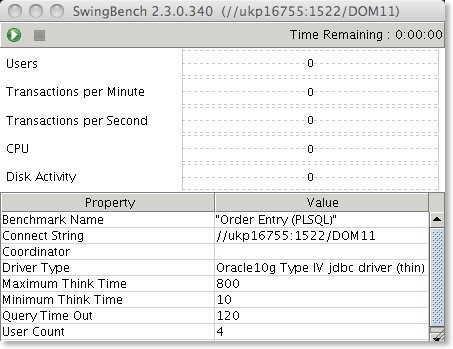
You can download it here
I introduced two new piece's of functionality eek.... sorry.
The first enables to choose which charts to display in the overview chart. It can only currently be enabled by editing the config file. (Im not going to change the UI any further in this build). To enable it simply save any config file and edit the file... There's a new xml list in the Preferences section which should look like
       <OverviewCharts>
         <OverviewChart>
            <Name>Disk</Name>
            <MaximumValue>2.147483647E9</MaximumValue>
         </OverviewChart>
         <OverviewChart>
            <Name>CPU</Name>
            <MaximumValue>2.147483647E9</MaximumValue>
         </OverviewChart>
         <OverviewChart>
            <Name>Response Time</Name>
            <MaximumValue>2.147483647E9</MaximumValue>
         </OverviewChart>
         <OverviewChart>
            <Name>Transactions Per Second</Name>
            <MaximumValue>2.147483647E9</MaximumValue>
         </OverviewChart>
         <OverviewChart>
            <Name>Transactions Per Minute</Name>
            <MaximumValue>2.147483647E9</MaximumValue>
         </OverviewChart>
      </OverviewCharts>
You can edit the list and include only the ones you want to show, optionally including a maximum value. ie.
     <OverviewCharts>
         <OverviewChart>
            <Name>CPU</Name>
         </OverviewChart>
         <OverviewChart>
            <Name>Transactions Per Second</Name>
            <MaximumValue>200</MaximumValue>
         </OverviewChart>
      </OverviewCharts>
The second change allows you to specify non autoscaling charts with maximum values inside of clusteroverview. This again needs to be edit inside of the clusteroverview.xml file
 <DisplayedCharts>
  <DisplayedChart>
   <ChartName>Overview</ChartName>
  </DisplayedChart>
  <DisplayedChart>
   <ChartName>UserConnections</ChartName>
   <Autoscale>false</Autoscale>
   <MaximumValue>50</MaximumValue>
  </DisplayedChart>
  <DisplayedChart>
   <ChartName>ControlPanel</ChartName>
  </DisplayedChart>
 </DisplayedCharts>
Im hoping the pain of a final (I promise) change will make things simpler for clusteroverview.
I've fixed a few further bugs as well. Some unhandled exceptions and things like the charts being grey in the overview chart when they clearly should have been white (shouldn't they?)
You can download it here
Turning on Debugging
29/10/07 12:28
Sometimes things go wrong... Sometime I make mistakes... I admit it.
To help me clear up those little issues debug information is essential... Previously to obtain this data you needed to edit the start up file. To simplify this process I've included a -debug option for the command line. So if you encounter some strange behavior, try turning this on first... Who knows it may solve the problem. if it still isn't obvious copy the text and contact me... I'll do my best to sort it out.
To help me clear up those little issues debug information is essential... Previously to obtain this data you needed to edit the start up file. To simplify this process I've included a -debug option for the command line. So if you encounter some strange behavior, try turning this on first... Who knows it may solve the problem. if it still isn't obvious copy the text and contact me... I'll do my best to sort it out.
New build of datagenerator
29/10/07 12:22
I've uploaded a new build of datagenerator. This build has a few new features
Let me know if you encounter any problems via the comments page
- A logging window during the generation phase that should make it easier to see what's going on
- TimesTen support for datageneration (No reverse engineering at present)
- Ability to turn on debugging from the command line (-debug)
Let me know if you encounter any problems via the comments page
Candidate build of Swingbench 2.3
19/10/07 23:24
I think Im getting close to a final version of swingbench 2.3. I've fixed tens of annoying bugs and have started testing(!!!). I've even started the 2.3 doc. Things are very busy at work so stick with me. I could really do with people sending me in bugs in this build. The more bugs the faster I'll fix them and the quicker the final build will make it through the door. This build features
- TimesTen support for the jdbc order entry benchmark (requires datagenerator)
- New log window for wizards
- Numerous fixes
- Fixes to orderentry benchmark
- These will be the last enhancements. Only bug fixes from here on in.
- Please provide feedback via the comments page or email me directly.
New version of TraceAnalyzer 0.1 build 99
18/09/07 22:49
Just finished a new build of TraceAnalyzer... I've uploaded it to the downloads page.
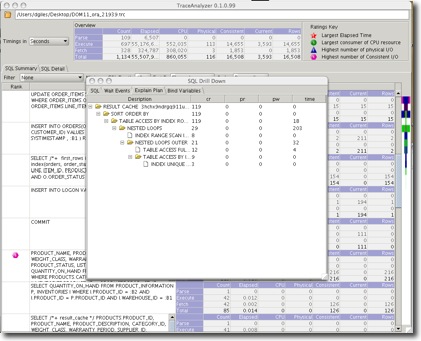
New features include
New features include
- Support for 10046 traces
- Bind parameters
- Explain Plans
- Wait Events
- Formatting of SQL
New release of swingbench, build 273
05/09/07 14:43
I hadn't realised its been over 4 months since I released a build of swingbench. So here it is. Just a few things
New build of Trace Analyzer nearly done as well.
- I changed the format of the config file again... Sorry.... Im almost certain this will be the last change
- The default chart is now overview although this can be changed in the preferences section
- The test connection button works for Oracle but sadly not for TimesTen yet. I'll get this fixed shortly
- Loads of minor fixes
New build of Trace Analyzer nearly done as well.
Fix for 2.2 of swingbench
29/06/07 14:14
I managed to break minibench in my last update of swingbench 2.2. I've uploaded a new build and taken advantage of the opportunity to refresh the libraries. Sadly this will mandate 1.5 as the new JVM. Apologies if this causes any inconvenience.
New Viewlets and Presentation
09/06/07 21:16
The RAC SIG on the 7th June
05/06/07 13:23
Just a quick reminder. I'll be doing a presentation to the RAC SIG on the 7th of June starting at 9am Pacific Time.
http://www.oracleracsig.org
I'll be giving an overview of swingbench, showing the various components and what it can be used for. I'll also give a demo of the new 2.3 version of swingbench and what will make it into the production build. With a bit of luck I'll also find time to answer questions...
I was also hoping that I could include a few of your stories whether positive or negative... So if you have any feedback you'd like to include drop me a line through the comments page.
Thanks
Dom
http://www.oracleracsig.org
I'll be giving an overview of swingbench, showing the various components and what it can be used for. I'll also give a demo of the new 2.3 version of swingbench and what will make it into the production build. With a bit of luck I'll also find time to answer questions...
I was also hoping that I could include a few of your stories whether positive or negative... So if you have any feedback you'd like to include drop me a line through the comments page.
Thanks
Dom
More fixes for datagenerator
09/05/07 16:43
Fixes include
• All menus now working
• Added sizing wizard to menu
• New Column wizard for DB sampler
• lots of other minor fixes
• zip file is now version numbered.
Let me know if this helps
• All menus now working
• Added sizing wizard to menu
• New Column wizard for DB sampler
• lots of other minor fixes
• zip file is now version numbered.
Let me know if this helps
Presentation to the US RAC SIG
09/04/07 20:34
I'll be doing a webcast on swingbench to the US RAC SIG on June 4th. I believe it will be starting at 9.30 PT (check the web sit for confirmation). I hope to detail what swingbench is capable of, the best practices when using swingbench and what I'll be doing next. I think Im suppose to be answering questions as well so you'll get a chance to have ago at me for all those annoying bugs....
So if your interested join in and I'll do my best to keep it informative and entertaining.
Dom.
So if your interested join in and I'll do my best to keep it informative and entertaining.
Dom.
Sometimes we all make mistakes...
02/04/07 11:52
Its not easy keeping an idea on all aspects of swingbench and sometimes I let stuff get through that really shouldn't. I try my best. I made a amateurish mistake on sequence numbers in the order entry bench. I've uploaded a new build of 2.2 which I'll include in the new 2.3 build shortly. If you find these annoying little bugs or potentially big issues drop me a line and I'll do my best to put it right.
A little coordinator/cpumonitor issue
21/03/07 08:31
I ran into this issue just recently. I couldn't get swingbench to talk to the coordinator and sadly the large RMI stack traces didn't explain it very well. It turns out that Java RMI expects the hostname and hostname.domain in the /etc/hosts file to be on a separate line to the 127.0.0.1 localhost entry i.e. on the second line.
For example change
127.0.0.1 localhost localhost.localdomain saturn saturn.planets
to
127.0.0.1 localhost localhost.localdomain
10.211.55.4 saturn saturn.planets
Making this simple modification gets everything working as expected. This problem is common in a DHCP environment (not ideal for benchmarking) where you acquire ip address and potentially hostnames dynamincally. Its good practice to keep them on separate lines anyway.
For example change
127.0.0.1 localhost localhost.localdomain saturn saturn.planets
to
127.0.0.1 localhost localhost.localdomain
10.211.55.4 saturn saturn.planets
Making this simple modification gets everything working as expected. This problem is common in a DHCP environment (not ideal for benchmarking) where you acquire ip address and potentially hostnames dynamincally. Its good practice to keep them on separate lines anyway.
TimesTen Fix
02/01/07 14:30
I know I had promised an update of the front end to swingbench in my next release however its been pointed out to me that I managed to break my TimesTen support in one of the earlier releases. I've just uploaded a new build that should fix these issues. I've also uploaded a simple TimesTen walkthrough. It can be found here
Trace Analyzer
13/11/06 20:21
So I haven't released much in the way of an update to swingbench lately mainly because work has been so busy...
However between meetings I put together a little program that parses Oracle trace files. Now I know TKProf does a fine job of this but I've never been really comfortable with having to continually rerun TKProf to change the ordering and filter out classes of statements. This came to a head just recently after looking through a big trace file and trying to figure out what SQL to work on first. I also thought that perhaps I could use a richer user interface to give a better overview on what has happened a particular run. So I started with the intention of figuring out how to parse the file and come up with some ideas on what to with the results... This turned out to be pretty trivial because of its structure and Java's regular expression support. With that taking much less time than expected I put them into a Java Swing JTable just to verify the results, which lead on to the next thing and then the next.... Needless to say the code is far from perfect but it does give a feel as to what could be achieved. If there is no interest I'll stop now and go back to finishing swingbench 2.3.
So In summary what does it do
• Parse trace files.
• Profile the data via a bar of the right had side of the scroll bar.
• Supports dynamic filtering and sorting of the data.
• Highlight the 5 worst performing pieces of SQL (elpased, cpu, physical etc)
What I'd like to add to it
• highlight concurrent SQL
• Explain Plans
• Display bind variables
• dump sql to flat files
• generate load files for swingbench
However unless theirs interest I probably won't bother..
You can download the code here
Leave your comments here.
However between meetings I put together a little program that parses Oracle trace files. Now I know TKProf does a fine job of this but I've never been really comfortable with having to continually rerun TKProf to change the ordering and filter out classes of statements. This came to a head just recently after looking through a big trace file and trying to figure out what SQL to work on first. I also thought that perhaps I could use a richer user interface to give a better overview on what has happened a particular run. So I started with the intention of figuring out how to parse the file and come up with some ideas on what to with the results... This turned out to be pretty trivial because of its structure and Java's regular expression support. With that taking much less time than expected I put them into a Java Swing JTable just to verify the results, which lead on to the next thing and then the next.... Needless to say the code is far from perfect but it does give a feel as to what could be achieved. If there is no interest I'll stop now and go back to finishing swingbench 2.3.
So In summary what does it do
• Parse trace files.
• Profile the data via a bar of the right had side of the scroll bar.
• Supports dynamic filtering and sorting of the data.
• Highlight the 5 worst performing pieces of SQL (elpased, cpu, physical etc)
What I'd like to add to it
• highlight concurrent SQL
• Explain Plans
• Display bind variables
• dump sql to flat files
• generate load files for swingbench
However unless theirs interest I probably won't bother..
You can download the code here
Leave your comments here.
Performance fix for datagenerator
16/10/06 19:56
Apologies for those that have already downloaded swingbench. I managed to engineer a bug into the latest build... I removed code responsible for array binding on inserts into the database. I've put it back in and, as you might expect, makes a significant difference to this new functionality. In the next couple of days I intend to document some simple findings illustrating the difference between the two approaches.
New build of datagenerator
13/10/06 20:20
I've uploaded the latest build of datagenerator. New features include
- User definable number of threads
- Data insertion directly into the database (Oracle)
- Ordered generation of data (largest first)
- Lots and lots of small bug fixes
New build of swingbench 2.3, build 144
14/09/06 23:10
I've just uploaded a build of new swingbench. This fixes a whole load of internal bugs that shouldn't have been that obvious to most people. This should be the last before I release the changes to the front end. This hopefully should allow all swingbench parameters to be maintained from a graphical front end.
Fix for DSS benchmark
30/08/06 17:03
I've included a fix for the DSS benchmark. The code used to label modules for services opened cursors without closing them properly. This prevented the benchmark from running for any period of time.
Fix for timezone support in datagenerator
30/08/06 17:00
I've included a fix for datagenerator that allows it to load the soe.xml and sh.xml file regardless of timezone the user is running in. I've also changed the default config file to a simple version to try and prevent this problem happening in the future.
Icon design
12/08/06 18:39
One of the problems when buiding a bespoke application is that you can never find a icon that reperesents exactly the action you need. Sure there are hundreds of sites on web that have "free" icons but these tend to be designed for the desktop. You can sometimes find sets that look very professional and you'd be proud to have them in your application. However you still have the issue that you don't only need icons to represent "file open" or "delete record" but also ones to represent the new action that is going make your application a best seller and the last think you need is a icon that sticks out like an ugly sore thumb.
So your left with a couple of choices. Go ahead and build that expensive icon set and hope that no one notices your child like attempts at graphic design. Or bite the bullet and commit your self to buiding the whole set your self. Now this not something you should attempt if you have no artistic aptitude or are short of patience. To be fair I've always been interested in graphic design but have never had the inclination or need to commit to buiding my own icon set. That was until I started working on datagenerator and swingbench. Im a one man team and I know many of you will be questioing the sense in spending time working on icons when it could better be invested in fixing bugs or working on new features, however one of my objectives when I started working on thes projects was to touch on a number of disciplines that my day to day job (core database) doesn't allow.
So once you've committed yourself to building your own bespoke set what tools do you use. Well theres no shortage of tools from bespoke icon editors to top end tools such as Adobe Illustrator and Photoshop, Paintshop pro etc. I've shyd away from icon editors in the past simply because I find them to restrictive. You find yourself spending to much time trying reproduce effects such as shadows and gradients which are pretty much the defacto standard on a modern desktop. I use two platforms these days, My Apple iMac and a Linux notebook. If I was designing icons and other graphics for a living I would invest the big bucks for a product like Adobe Illustrator... I wouldn't even hesitate, from my limited experience nothing comes close, however I dont do this for a living and it doesn't make any sense to spend a couple of thousand pounds for a dozen icons (although if someone has a spare license lying around...).
Luckily the open source market has a number of alternatives that provide a viable alternative. i dont have the time to list the various projects building superb tools to compete with the various commercial offerings but two stand out. The Gimp (worth using just to shout accross the office "I working on the Gimp") and Inkscape. The Gimp is primarily used as a raster or digital paint tool as is comaparable to Adobe Photoshop. Inkscape is a vector paint tool and is comparable to Adobe illustrator in terms of use if not functionality, it also has the added benefit of working directly in SVG. Working in a scalable format, such as SVG, is a real asset to icon design it means you can work on a large scale and then shrink or enlarge your design with very little loss in quality.
So Ive comitted to Inkscape and Im very impressed so far. It appears rock solid, has ports for MacOS and Linux, has tools for viewing your designs as they would appear as icons and has some genuinely inovative features. However it does have some flaws.... The documentation is very weak, some of the dialogues are confusing at best and its not a native port to MacOS (that really would set the cat amongst the pigeons).
That set Ive started work and its pretty straight forward to put together some consistent icons. Ill post the results shortly... don't laugh
So your left with a couple of choices. Go ahead and build that expensive icon set and hope that no one notices your child like attempts at graphic design. Or bite the bullet and commit your self to buiding the whole set your self. Now this not something you should attempt if you have no artistic aptitude or are short of patience. To be fair I've always been interested in graphic design but have never had the inclination or need to commit to buiding my own icon set. That was until I started working on datagenerator and swingbench. Im a one man team and I know many of you will be questioing the sense in spending time working on icons when it could better be invested in fixing bugs or working on new features, however one of my objectives when I started working on thes projects was to touch on a number of disciplines that my day to day job (core database) doesn't allow.
So once you've committed yourself to building your own bespoke set what tools do you use. Well theres no shortage of tools from bespoke icon editors to top end tools such as Adobe Illustrator and Photoshop, Paintshop pro etc. I've shyd away from icon editors in the past simply because I find them to restrictive. You find yourself spending to much time trying reproduce effects such as shadows and gradients which are pretty much the defacto standard on a modern desktop. I use two platforms these days, My Apple iMac and a Linux notebook. If I was designing icons and other graphics for a living I would invest the big bucks for a product like Adobe Illustrator... I wouldn't even hesitate, from my limited experience nothing comes close, however I dont do this for a living and it doesn't make any sense to spend a couple of thousand pounds for a dozen icons (although if someone has a spare license lying around...).
Luckily the open source market has a number of alternatives that provide a viable alternative. i dont have the time to list the various projects building superb tools to compete with the various commercial offerings but two stand out. The Gimp (worth using just to shout accross the office "I working on the Gimp") and Inkscape. The Gimp is primarily used as a raster or digital paint tool as is comaparable to Adobe Photoshop. Inkscape is a vector paint tool and is comparable to Adobe illustrator in terms of use if not functionality, it also has the added benefit of working directly in SVG. Working in a scalable format, such as SVG, is a real asset to icon design it means you can work on a large scale and then shrink or enlarge your design with very little loss in quality.
So Ive comitted to Inkscape and Im very impressed so far. It appears rock solid, has ports for MacOS and Linux, has tools for viewing your designs as they would appear as icons and has some genuinely inovative features. However it does have some flaws.... The documentation is very weak, some of the dialogues are confusing at best and its not a native port to MacOS (that really would set the cat amongst the pigeons).
That set Ive started work and its pretty straight forward to put together some consistent icons. Ill post the results shortly... don't laugh
New build of datagenerator
07/08/06 20:28
I've uploaded a new build of datagenerator (46). The update to this build is primarily to include new debug code to try and diagnose a issue with reading the default config files shipped with datagenerator. This prevents users from reading the data inside of the xml file. This appears to be a national language issue since the data is shipped in UK format. If you have this issue, uncomment the debug line in the shell script or bat file that starts datagenerator and post the output to me via the comments page.
Minor Swingbench update to 2.3, build 125
20/07/06 21:14
Hi just a minor patch update to fix a few minor updates. Yup I do make changes based on feedback. Thats assuming I have time... Things are slowing down just a little at work as people head off on holiday so Im hoping to get 2.3 finished soon.. just the UI changes now... I'll be at Oracle HQ in the US next week so Im not likely to be able to respond to much email. For any of my work colleagues that need to get in touch I'll be on the mobile...
Back to the minor fixes
Back to the minor fixes
- Sorted out the save, save buttons so they should work as expected.
- Now a Transactions per second option for charbench(if this is useful I'll include it inside of swingbench and minibench)
- Benchmark name now include on window title for swingbench
DSS benchmark uploaded
17/07/06 20:29
I've just uploaded a new build of swingbench and datagenerator to the website. They can be downloaded here. The reason for the joint release is that they both provide support for a new DSS benchmark. I've described how to install and run the benchmark here. The benchmark still needs work and testing to determine some standard metrics but it hangs together. Let me know what you think here.
New DSS benchmark available (or nearly).
07/07/06 20:33
Over the last few days I've been putting together swingbench's first DSS benchmark. It uses datagenerator to create the schema and then a new config file to generate the load. The only reason I haven't posted it yet is that our cluster is currently in pieces and is slowly being put back together so I'haven't had a chance to test it on a large scale machine. Im certain of a few things. It should eat I/O and CPU. I haven't included any materialized views to improve perfomance simply because in the past I've been asked for a benchmark to test the I/O sub system, I think this is it. It currently needs a little work to get it to scale to large sizes but I'll post instructions. The ultimate aim is to deliver three sizes 100GB, 500GB and 1TB. There's no reason why they couldn't be bigger its just that I'll lack the resource to test it. If you'd like to give it a spin drop me a line and I'll send you the code. Regardless I hope to post the code by the end of the week.
Datagenerator update to build 31
27/06/06 20:29
I've been slowly rounding off some of the rough edges in datagenerator. In this release I've fixed a few bugs and provided a wizard to size tables up in a simpler fashion (hint its the new button on the tool bar). I've also included the ability to store data in side of the config file. This is really useful if you have to take reference data from a reversed engineered schema. To demonstrate this I reverse engineered the oracle "sales history" schema and included the reference data for "TIMES","PRODUCTS" etc. The whole schema including reference data can now be shipped in a single file. I've included this file in this build (sh.xml in bin/winbin directory). This means you should be able to generate a multi terabyte "sh" schema.... This functionality will fome the basis of a new DSS benchmark in the next few weeks for swingbench. Let me know if you encounter any problems.
Oh and I fixed a stupid scripting bug the windows bat file to lauch datagenerator...
Oh and I fixed a stupid scripting bug the windows bat file to lauch datagenerator...
Swingbench update to build 117
27/06/06 20:16
Nothing amazingly new in this build other than some fixes. These relate to
- Opening new config files left the old configuration in memory
- The default config in windows was invalid (and no one mailed me... shame)
- Fix to work around an Oracle connection pooling bug
- No reports generated unless a System username/password was included in the config file
IllegalMonitorState Exception in Datagenerator on Itanium.
18/05/06 20:29
I've encountered a weird bug... not sure if its my fault or the the JVMs. Basically when running the latest version of datagenerator on a multi CPU Itanium box I get this exception thrown after a (seemingly random) period of time. This only happens on an Itanium machine. The other variable here is that because its Itanium I have to use the JRockit 1.5 JVM. The code seems to work fine on every other multi CPU environment I've tried... Has anyone else had this problem?
Walkthrough for datagenerator available
12/04/06 21:24
Minor update to Datagenerator
06/04/06 20:32
I've fixed a few minor issues with the build I put up last night. The new release has a build number to enable you to more easily track what's new. I also fixed a minor bug with the environment variables in the windows build.
Datagenerator 0.3 release
05/04/06 22:08
I've just uploaded datagenerator 0.3 to the downloads page. Its a big step forward. Apart from being multithreaded and generally much faster it includes a wizard that allows you to reverse engineer a schema... currently it only reverse engineers the tables and primary keys but I'll include more functionality over time. I've used it to build vey large schemas for the order entry benchmark much faster than I was perviously able to. In the next couple of days I'll post a script and instruction on how to do this.. In the mean time enjoy
Update to Swingbench 2.3 Beta
14/03/06 19:55
Further fixes for connection pooling and new support for the order entry schema to be build without partitioning.
Swingbench 2.3 Beta available
08/03/06 22:30
I've just posted swingbench 2.3 to the downloads page. This build still needs some work but it has some genuinely useful features.
These include
Documentation (online and pdf) to follow shortly.
These include
- Update to frontend of "minibench"
- New simple "Stress Test" benchmark for both Oracle and TimesTen
- TimesTen support
- User defineable length of benchmark run
- Better statistics in reports output
- Benchmark comparison tool
- Improved connection pooling and fAN support (via swingconfig file only)
- Minor changes to swingconfig.xml
- Build numbers for each release
- User selectable timings i.e. measurements in seconds, centiseconds, millseconds, microseconds etc.
Documentation (online and pdf) to follow shortly.
BMCompare
23/02/06 20:19
Swingbench 2.3 should be ready shortly features a new tool called bmcompare which allows you to compare runs of benchmarks... Its pretty simply currently but I like it. Its simplifies the job of brining all of the data together. It will be especially useful for some of the users of swingbench how use swingbench as a regression test tool.
So whats new in Swingbench 2.3
15/02/06 20:08
I've been putting the final touches on the 2.3 release of swingbench. So far the features that have made it in are
Im still also hoping to include a utility that will provide side by side comparison of benchmark runs. For example this will allow you to run six benchmarks and compare the differences between each one. So you could increase the user count by 50 percent each run and then determine what difference this makes to the server. It will be pretty simple at first but Im hoping it will become more sophisticated over time.
Things that aren't likely to make it but will be in 2.4
- TimesTen support
- Timer support. This allows you to run the benchmark for a given time
- User selectable timings i.e. measurements in seconds, centiseconds, millseconds, microseconds etc.
- Code modification to support 1.5
Im still also hoping to include a utility that will provide side by side comparison of benchmark runs. For example this will allow you to run six benchmarks and compare the differences between each one. So you could increase the user count by 50 percent each run and then determine what difference this makes to the server. It will be pretty simple at first but Im hoping it will become more sophisticated over time.
Things that aren't likely to make it but will be in 2.4
- Data warehosuing benchmark
- Update to clusteroverview
Update to Swingbench to support 1.4 JVM
25/01/06 23:02
Apologies but I've posted another minor change to swingbench to support the 1.4 JVM. You should only download a new build if you don't have access to a 1.5 JVM.
What next for swingbench?
20/01/06 22:51
Im at a sort of a crossroads with swingbench and Id like some feedback on what course I should follow next. There are a number of features I've been promising for a while
If you have strong feelings on any of these drop me a comment.
- A new data warehousing benchmark, this also requires I get datagenerator into a more complete state.
- Better multiple load generator support, clusteroverview hasn't really received much attention in the recent point releases
- Better reporting, I've always planned to integrate a mini statspack so that each run results in a more complete break down on not just the results but what happened to the database
- A html front end, I could do this either by integrating it into Enterprise manager (not as hard as you think) or writing a bespoke JSP front end.
- HTTP load generation support, I've been promising this for a while and have written the engine and have nearly got the code in a state where I could drop it in. But I've a feeling the market is a wash with HTTP load generators.
- None of the above and just tighten up the code.
If you have strong feelings on any of these drop me a comment.
Minor update to swingbench 2.2
11/01/06 20:27
I've just updated swingbench 2.2 with a few minor bug fixes.. It sorted out one or two issues with the wizards used to create the benchmark schemas.
Swingbench 2.2 is now production
19/12/05 22:28
After finding a few spare hours I believe that 2.2 is now ready to be considered stable.... There are a few non serious few bugs but I'll fix those as I find time. Let me know what you think...
J2SE 5.0 and Swingbench
15/12/05 19:57
I've begun looking at the internal of the swingbench code. Its not massively complicated but it is a little opaque. Its was written a long time ago when many of Java's constructs were new to a hardened C programmer. Im slowly going through the code and tidying it up, for valid reasons which I'll come to in a second. However it has given me the chance to use the functionality offered in J2SE 5.0 primarily enumerators and generics. These tidy up the code a lot and make it almost readable. Its also made me more determined to re-factor the code and make it much cleaner and modular.
The reason Im migrating to J2SE 5.0 is purely to support Oracle's new in memory database TimesTen. To measure its response time accurately I need microsecond timings. Since J2SE 5.0 offers nano second timing support where the platform supports it it made sense to do it all in one go. Sadly its a much bigger modification than I indented since it effects most of the code base. Still its proving interesting. Expect TimesTen support in a build almost immediately after 2.2 goes production.
The reason Im migrating to J2SE 5.0 is purely to support Oracle's new in memory database TimesTen. To measure its response time accurately I need microsecond timings. Since J2SE 5.0 offers nano second timing support where the platform supports it it made sense to do it all in one go. Sadly its a much bigger modification than I indented since it effects most of the code base. Still its proving interesting. Expect TimesTen support in a build almost immediately after 2.2 goes production.
Swingbench Version 2.2 (release candidate)
05/12/05 12:31
Swingbench version 2.1h is now 2.2. Im certain I've included enough new functionality to justify this change. Over the last week or so I've managed to add a whole raft of new features and fixes that should simplify its use. There won't be any new features in this current release just bug fixes. The intention is to have it stable and the doc finished by the end of December. I've also updated the swingbench manual, I'll update clusteroverview's doc shortly. So in summary new in 2.2...
New in 2.2
Still to come
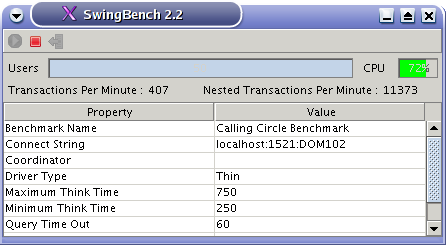
minibench
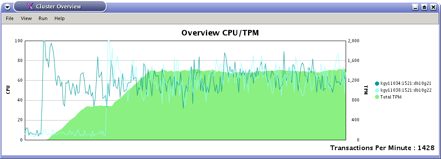
CPU overview
New in 2.2
- A new lightweight graphical load generator called "minibench"
- The coordinator now has a number of command line options (start, stop, status, run, halt)
- The coordinator can now be run in ether graphical or character mode
- The charting engine now uses Oracle's BIBeans graphing technology
- Better exception handling and error messages in both swingbench and clusteroverview
- Users can now turn off jumping to the events panel in swingbench
- The user chart in clusteroverview now allows users to specify monitored users
- Swingbench can logon/logoff users between transactions (experimental)
- Minor changes to swingconfig.xml
- New Look and Feel
- charbench/swingbench/minibench now have a number of command line options allowing them to override configuation file settings. This should simplify configuration.
- CPU monitor (accessible via coordinator)
- charbench can now display transaction/cpu load in sar/vmstat like format
- swingbench can now display graphically display cpu load
- Lots of fixes to the benchmark install wizards
- order entry benchmark can now be scaled to 100GB
- CPU monitor for database nodes in clusteroverview
- Simple CPU monitor in minibench
Still to come
- Localisation support
- TimesTen support
- Simple generic load test
- DSS benchmark
minibench
CPU overview
New release of DataGenerator
12/10/05 20:28
Just released a new build of Datagenerator. I've stuck a graphical front end on it so its much easier to use now. Its never going to be amazingly fast because of its generic nature. What Im aiming to achieve is to allow the user to reverse engineer a schema and then "Super Size" it. The main modivation for this utility is to provide a benchmark for datawarehousing using swingbench that dosn't involve downloading a terabyte of data. As to whats new in it
* New graphical front end.
* New "Enumerator" data generator type
* Some bug fixes
Not much, but things have been pretty busy at work. The implementation of the reverese engineering functionality will depend on how long I can avoid doing all of the work on swingbench I've promised people.
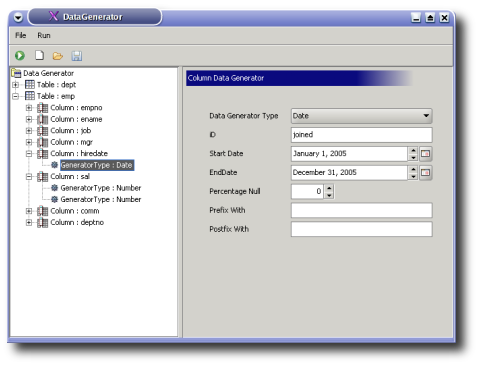
* New graphical front end.
* New "Enumerator" data generator type
* Some bug fixes
Not much, but things have been pretty busy at work. The implementation of the reverese engineering functionality will depend on how long I can avoid doing all of the work on swingbench I've promised people.