Large SOE builds... things to watch for
25/03/10 10:57 Filed in: Swingbench
A couple of things to watch for if you are building a large SOE schema. The first is temp space. I guess its obvious but if you are building a 1TB schema with 100GB+ tables the indexes are going to be pretty big as well. If you are creating big indexes you need plenty of TEMP. The number of schema’s I’ve looked at that haven’t had their indexes build is amazing. I guess this is partly my fault as well. I’ll include a start and end validation process in the next build. Should have done this before but I guess people weren’t building such big schema’s
As a guide line for a schema of size “x” I’d have at least “x/6” worth of temp space i.e. 1TB schema needs about 180GB of temp. You can resize it after the build to what ever you decide is appropriate.
As to what it should look like on completion... well something like this
SOE@//localhost/orcl > @tables;Tables======Table Rows Blocks Size Compression Indexes Partitions Analyzed-------------------- ---------- ----- ------ ----------- ------- ---------- ----------WAREHOUSES 1,000 60 1024k Disabled 2 0 < WeekORDERS 225,000 1,636 13M Disabled 5 0 < WeekINVENTORIES 924,859 10,996 87M Disabled 3 0 < WeekORDER_ITEMS 587,151 2,392 19M Disabled 3 0 < WeekPRODUCT_DESCRIPTIONS 1,000 60 1024k Disabled 2 0 < WeekLOGON 50,000 250 2M Disabled 0 0 < WeekPRODUCT_INFORMATION 1,000 60 1024k Disabled 3 0 < WeekCUSTOMERS 200,000 2,014 16M Disabled 5 0 < Week
Another really important thing is to include the SOE_MIN_CUSTOMER_ID and SOE_MAX_CUSTOMER_ID in the environment variables within the config file. This will reduce the startup time of the benchmark. Follow the instructions below or edit the config file
Select the Environment Variables tab and press the button (you’ll need to do this for each environment variable).

Add two Enviroment variables
You can determine what thes values are by running a piece of SQL similar to this when logged into the SOE schema
SELECT /*+ PARALLEL(CUSTOMERS, 8) */ MIN(customer_id) SOE_MIN_CUSTOMER_ID, MAX(customer_id) SOE_MAX_CUSTOMER_ID FROM customers
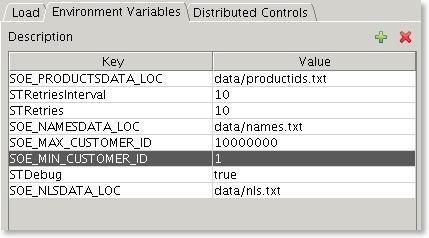
After adding the variables you should end up with something that looks similar to this
As a guide line for a schema of size “x” I’d have at least “x/6” worth of temp space i.e. 1TB schema needs about 180GB of temp. You can resize it after the build to what ever you decide is appropriate.
As to what it should look like on completion... well something like this
SOE@//localhost/orcl > @tables;Tables======Table Rows Blocks Size Compression Indexes Partitions Analyzed-------------------- ---------- ----- ------ ----------- ------- ---------- ----------WAREHOUSES 1,000 60 1024k Disabled 2 0 < WeekORDERS 225,000 1,636 13M Disabled 5 0 < WeekINVENTORIES 924,859 10,996 87M Disabled 3 0 < WeekORDER_ITEMS 587,151 2,392 19M Disabled 3 0 < WeekPRODUCT_DESCRIPTIONS 1,000 60 1024k Disabled 2 0 < WeekLOGON 50,000 250 2M Disabled 0 0 < WeekPRODUCT_INFORMATION 1,000 60 1024k Disabled 3 0 < WeekCUSTOMERS 200,000 2,014 16M Disabled 5 0 < Week
Another really important thing is to include the SOE_MIN_CUSTOMER_ID and SOE_MAX_CUSTOMER_ID in the environment variables within the config file. This will reduce the startup time of the benchmark. Follow the instructions below or edit the config file
Select the Environment Variables tab and press the
button (you’ll need to do this for each environment variable).Add two Enviroment variables
- SOE_MIN_CUSTOMER_ID : The value equals the smallest customer id in the data set, usually 1
- SOE_MAX_CUSTOMER_ID : The largerst customer id found in the data set
You can determine what thes values are by running a piece of SQL similar to this when logged into the SOE schema
SELECT /*+ PARALLEL(CUSTOMERS, 8) */ MIN(customer_id) SOE_MIN_CUSTOMER_ID, MAX(customer_id) SOE_MAX_CUSTOMER_ID FROM customers
After adding the variables you should end up with something that looks similar to this
blog comments powered by Disqus